

If you’re drowning in email, the short answer is: turn off notifications, batch-process in two fixed windows, unsubscribe aggressively, and apply a five-decision triage to every message. That stops the bleeding. If volume still outpaces your time, the common case above 150 emails/day, alfred_ reads your inbox continuously and produces a morning brief: 3 decisions, 2 follow-ups, 1 overnight-important email. You act on the brief in 10 minutes instead of triaging an inbox for 90.
Most email management advice treats overload as a discipline problem, get up earlier, batch at noon, try inbox zero. These work briefly. They fail when you travel, get sick, or hit a deadline crunch. The system that worked at 50 emails a day breaks at 150.
The structural reality: email volume scales with your seniority, your organization’s size, and the number of projects you run. What you need isn’t better email discipline. It’s a system that degrades gracefully under load.
28% of the workweek
Average knowledge worker time spent on email (≈11 hrs/week). Adobe's annual survey puts it higher: 3.1 hours/day, 15.5 hours/week on work email alone.
121 emails/day
Average inbound professional volume, the scale at which manual triage systems begin to fail
275 interruptions/day
Average for Microsoft 365 users, roughly one every 2 minutes, most driven by email and chat notifications
Why Your Current Approach Isn’t Working
Most email systems fail for predictable structural reasons, not personal failing. Understanding the failure modes matters more than trying another system.
Continuous monitoring creates an interruption tax. Research consistently shows recovery time after an interruption is 15–25 minutes. At 275 interruptions/day, you’re not managing email, email is managing your attention.
Social pressure overrides your system. 50% of senders expect a reply within 24 hours. Any system that asks you to ignore that pressure without addressing the underlying norm will be abandoned at the exact moment stress peaks.
Volume breaks manual systems. A folder system that works at 40 emails/day stops working at 120. An inbox-zero workflow that takes 20 minutes in the morning takes 90 when you’ve been in back-to-backs. Manual systems fail suddenly, and recovery requires a reset most people never complete.
The inbox is being used as a task manager. Leaving emails unread or starred to signal “needs action” is the most common failure pattern. Inboxes have no priority ordering, no deadlines, no categorization, everything looks equally urgent and nothing gets done reliably.
The System: Four Structural Changes
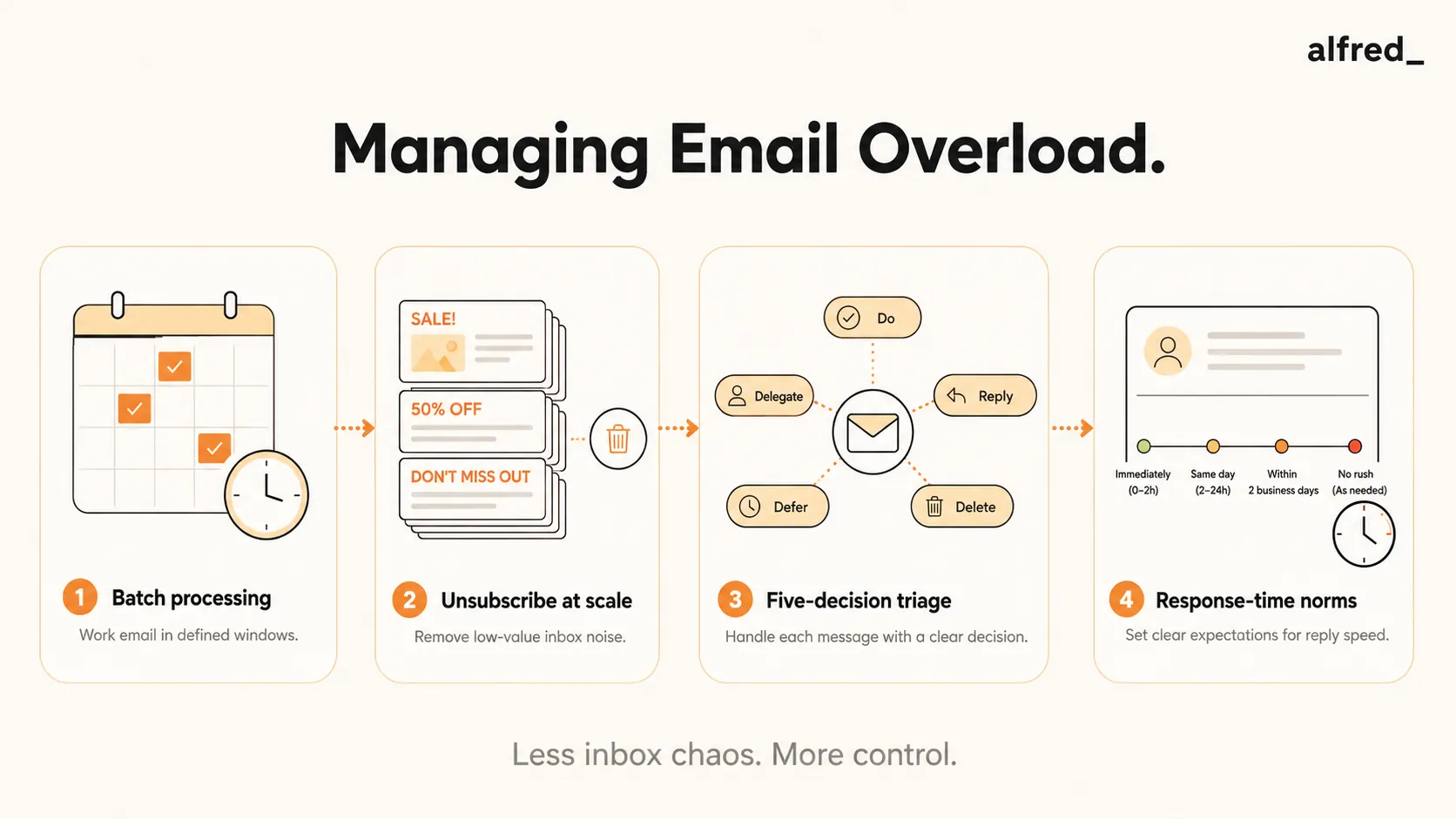
These four address causes, not symptoms. They’re independent; the first two carry most of the impact.
1. Batch Processing: Defined Email Windows
Stop monitoring continuously. Choose two or three fixed windows per day (morning, midday, late afternoon) and process only in those windows. Close your email client outside them. Professional response-time expectation averages 24 hours, a window every 3–4 hours exceeds most sender expectations.
The mechanism that makes this work: notification suppression. Turning off email notifications is the single highest-leverage action on this list. It converts email from a reactive channel into a scheduled one.
Set an auto-reply that states your cadence (“I check email twice daily and typically respond within four hours during business days”). This proactively manages sender expectations and addresses the social-pressure problem directly.
2. Unsubscribe at Scale
A significant chunk of those 121 emails/day is automated, newsletters you subscribed to once, vendor notifications you never configured, marketing from products you bought years ago. These are scheduled noise masquerading as communication.
Spend one 30-minute session unsubscribing from anything not sent by a human. Unroll.me or Gmail’s built-in filters handle this systematically. For email that can’t be unsubscribed from but is consistently low value, create a filter that auto-archives and labels. You preserve access without letting it claim your attention.
3. The Five-Decision Triage
During each email window, apply one decision to every message. Not two. Not “I’ll come back to it.” The five, in order of preference:
- Delete or archive immediately. No action required, no reference value. Most newsletters, most CC chains, most FYI emails.
- Reply in two minutes or less. Sub-two-minute replies happen now. Deferring creates overhead: you’ll re-read, re-orient, and reply anyway.
- Delegate. Forward with a clear instruction, archive the original. You’re responsible for routing, not handling, every email.
- Defer with a date. If it needs more than two minutes and only you can do it, the task goes to your actual task manager (not your starred inbox) with a specific date. Archive the original.
- Schedule. Meeting request or longer conversation? Send a calendar invite or scheduling link immediately and archive. Don’t let scheduling back-and-forth occupy inbox space.
Merlin Mann’s 2007 Inbox Zero method is the origin. The “zero” referred to the time your brain spends in the inbox, not the message count. Mann confirmed in 2020 that he doesn’t maintain zero. The decision discipline works; the number-chasing doesn’t.
4. Response-Time Norms
The 24-hour expectation is a norm, not a law. For people you email frequently (team, regular clients, collaborators), state your response-time expectations directly: “I respond to email within one business day; for urgent matters, please call.” For genuinely urgent communication, define an alternative channel and enforce it. The channel distinction is what makes batch processing socially viable.
Why Manual Systems Still Break
These four changes are real improvements. They’ll reduce your email time, anxiety, and interruption overhead. But they all require consistent maintenance, and consistent maintenance fails under stress.
The pattern is predictable: you implement the system, it works for 2–4 weeks, a high-pressure period hits (launch, negotiation, personal event), you stop batch-processing, the unsubscribes don’t get done, and the inbox climbs back to 400 unread. The system didn’t fail because you were undisciplined. It failed because it required manual effort that competed with the work you were trying to free up time to do.
This is a structural limitation of manual systems under variable load, not a habits problem.
What Actually Helps: The Tools Compared
| Tool | What It Does | Price | Who uses it |
|---|---|---|---|
| alfred_ | Continuous triage + urgency classification + drafted replies + morning daily brief across Gmail/Outlook | $29.99/mo | Overload at scale (100+ emails/day), replaces inbox with brief |
| SaneBox | Rules-based sorting into folders (SaneLater, SaneBlackHole) | $7–36/mo | Moderate volume, reduce inbox noise without changing workflow |
| Superhuman | Fast keyboard-first email client with AI autocomplete | $30/mo | Speed-focused power users at normal volume |
| Shortwave | Gmail client with AI triage and bundling | $30-$120/seat/mo | Gmail-only users who want AI-native interface |
| Unroll.me | One-shot bulk unsubscribe tool | Free | The unsubscribe-at-scale step above, not a triage system |
| Manual system (no tool) | Batch windows + 5-decision triage | $0 | Up to ~100 emails/day, stable workload |
The tools are not interchangeable. Sorting (SaneBox) reduces noise but you still open your inbox cold. Speed (Superhuman) helps you move faster through the same volume. Triage-and-draft (alfred_) is the only category that changes the form email reaches you in, a brief instead of an inbox.
The AI Shortcut: From Inbox to Briefing
The categorical alternative to managing email manually is having AI manage it, not as a productivity gimmick but as a structural shift in how information arrives.
alfred_ reads your inbox each morning and produces a daily briefing: a structured summary of what needs your attention today. Not 121 emails. A brief with the three decisions waiting for you, the two follow-ups that have been pending more than 48 hours, and the one email from someone important that arrived overnight. You spend 10 minutes acting on a brief instead of 90 minutes triaging.
The distinction is categorical, not incremental. Manual triage reduces time on email. AI triage changes the form: you no longer process an inbox, you act on a structured brief. The inbox still exists. You just don’t have to touch it until the important things have been surfaced.
alfred_ also drafts replies. When a message needs a response, alfred_ produces a contextually accurate draft based on the thread, sender relationship, and your prior communication patterns. You review and send, typically 2–5 minutes instead of 15–30.
The honest limitation: AI triage works well on emails with clear signals (sender identity, urgency language, explicit questions, deadlines). It’s weaker on emails that require relationship subtext, the email from a client who is politely frustrated, or the internal message that reads routine but signals a political shift. For those, the brief surfaces them; the human judgment is still yours.
What to Do Today
If the inbox feels unmanageable right now, do three things before lunch:
- Turn off email notifications on every device. Mac/iPhone: Settings → Notifications → Mail → off. Windows/Android: same idea.
- Schedule two email windows on your calendar for today (10am and 3pm, 30 min each). Block them as “Email.”
- Spend 15 minutes of window one unsubscribing from automated senders. Use Unroll.me or Gmail’s built-in unsubscribe link.
If you’re still drowning a week from now, that’s a volume-to-time mismatch, the structural case for AI triage. Try alfred_ and see what a morning brief replaces.




