


You have a folder called “Marketing,” another called “Clients,” and a notes app with seven years of accumulated thinking you can never actually find anything in. You organized it all by topic, the way a filing cabinet works, and it still feels like a junk drawer. Tiago Forte’s argument is that topic is the wrong axis entirely. Organize by how actionable something is right now, and a pile of static reference material turns into a working external brain. Here is what PARA’s four categories are, the one distinction that makes or breaks the system, and where it tends to quietly fall apart.
What PARA Stands For
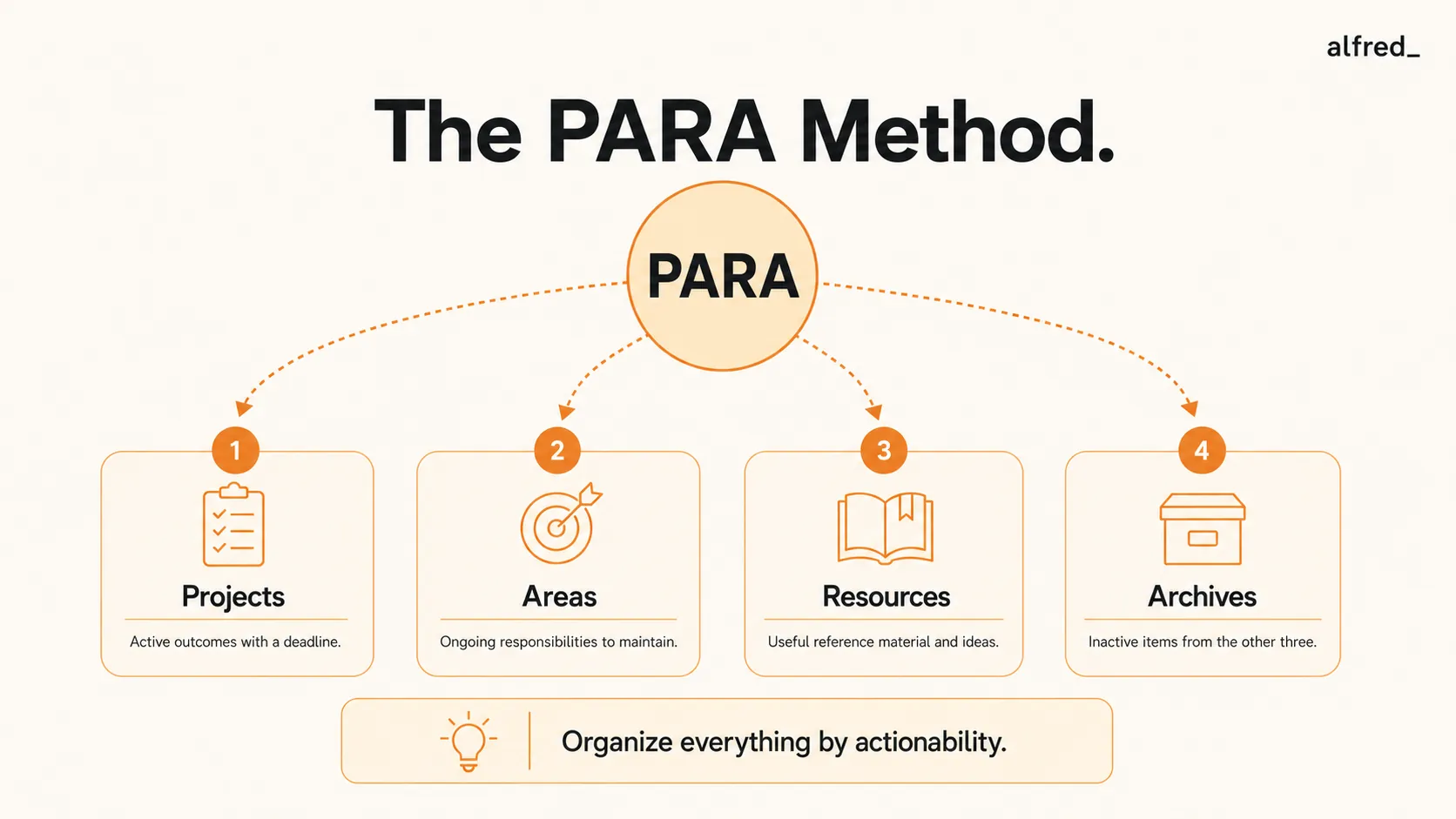
Tiago Forte introduced PARA in a 2017 blog post on Forte Labs and expanded it in Building a Second Brain (Atria Books, 2022). The four categories are:
P
Projects
“A series of tasks linked to a goal, with a deadline.” Example: “Launch redesigned website by March 15.” Projects have a finish line. They are complete when the goal is achieved.
A
Areas
“A sphere of activity with a standard to be maintained over time.” Example: “Health,” “Finances,” “Direct Reports.” Areas have no finish line. Health is never “done.”
R
Resources
“A topic or theme of ongoing interest.” Example: “Copywriting,” “Note-taking systems,” “Investment strategies.” Resources are reference material for potential future use, not tied to current active work.
A
Archives
“Inactive items from the other three categories.” Completed projects, closed Areas, outdated Resources: everything that is no longer active but shouldn’t be deleted.
4 categories
Projects, Areas, Resources, Archives: Forte's complete organizing framework for all digital information
Tiago Forte, Building a Second Brain (Atria Books, 2022)The Core Insight: Organize by Actionability, Not Subject
The conventional approach to digital filing is categorical: marketing documents go in the marketing folder, financial documents go in the finance folder, personal notes go in the personal folder. This mirrors how a physical filing cabinet is organized. It feels logical.
Forte’s argument is that this is the wrong axis for knowledge work. The right question when saving information is not “what is this about?” but “how actionable is this right now?”
Projects are the most actionable: they’re actively being worked on, with a deadline. Areas are ongoing but without deadlines; you maintain them but don’t sprint toward completion. Resources are reference material for potential future use, interesting but not driving current work. Archives are inactive, with no current relevance but worth keeping.
The practical benefit: when you open your system, your Projects folder should mirror your current reality. If it does, you have a functional external brain. If it doesn’t, it’s a clutter pile with a name.
The actionability axis changes how you retrieve information, not just how you store it. When you’re working on a project, everything relevant to that project is in one folder: your notes, your references, your drafts, your meeting notes. You don’t have to search across a marketing folder and a clients folder and a notes folder to reconstruct the context. It’s all under the project.
The Projects vs. Areas Distinction
The most important distinction in PARA (and the most commonly confused) is between Projects and Areas. Forte considers this the critical distinction because it determines whether something gets active attention or maintenance attention.
The test: Does this have a finish line? A deadline? A clear definition of done?
“Write Q1 board presentation” is a Project. It has a deadline and a completion state. When the presentation is delivered, the project is over.
“Board relationships” is an Area. It has no deadline. Maintaining good board relationships is an ongoing standard, not a goal with a finish line. You can’t complete it. You can only maintain it.
This matters because how you engage with a Project is different from how you engage with an Area. A Project requires active sprint attention: blocked work time, next actions, progress tracking. An Area requires maintenance attention: periodic check-ins, standards monitoring, relationship cultivation.
The practical consequence: if your Projects list contains things that are actually Areas, you’ll feel perpetually behind. Areas dressed as Projects never get finished, and a project that never finishes is not a project. It’s a source of chronic low-level guilt.
The Second Brain Connection
Forte borrowed his foundational premise from David Allen. Building a Second Brain opens with Allen’s epigraph: “Your mind is for having ideas, not holding them.” Forte’s extension of this premise is that GTD addresses actionable tasks (the “next physical action”) but doesn’t address the broader ecosystem of information that surrounds tasks: notes, reference documents, meeting summaries, research, files.
PARA is the organizational infrastructure for that ecosystem. Where GTD gives you a trusted system for tasks and actions, PARA gives you a trusted system for everything surrounding those tasks.
Allen’s “mind like water” is the ideal: a state where the mind responds to inputs with appropriate force and returns to calm, unencumbered by open loops. Forte’s “second brain” is the infrastructure for reaching it.
Forte’s explicit recommendation is to use GTD and PARA together: GTD for task management, PARA for information organization. GTD tells you what to do next. PARA tells you where to find everything you need to do it.
How PARA Stacks With GTD
The GTD and PARA combination is not accidental. Forte designed PARA as a complement to GTD, not a replacement. The systems address different problems.
GTD manages the actions side: the inbox, the project list, the next actions list, the waiting-for list, the someday-maybe list. These are all about what to do and when.
PARA manages the reference side: all the files, notes, documents, and information that support the work those actions represent. The note-taking app, the file system, the reference library.
When they run together, your GTD project list and your PARA Projects folder should mirror each other. Every active project in GTD has a corresponding folder in PARA. When a project is completed or abandoned in GTD, the PARA folder moves to Archives. The two systems stay synchronized because they’re describing the same reality from different angles.
The Failure Mode: Projects and Resources Collapse
PARA requires honest categorization at the moment of capture, and most people are not in a reflective state when they’re saving information. The typical context for filing something is: you just read an article, you’re about to jump to the next thing, you drag it into a folder and move on. In that state, careful categorization is the exception, not the rule.
The practical failure mode is that Projects and Resources collapse into each other. Everything interesting becomes a Resource. The Projects folder stays artificially clean. The Resources folder becomes a vast pile of interesting-but-not-actionable material with no organizing logic.
Forte recommends a weekly check: does your Projects folder reflect your actual active commitments? If you have active projects that don’t have a corresponding folder, the system has drifted. If you have folders in Projects for things that are no longer active, they should be archived.
The weekly maintenance ritual is, for PARA, what the Weekly Review is for GTD: the mechanism that prevents the trusted system from decaying into a pile of stale items.
The Same Question, Applied to Your Inbox
PARA’s whole move is to stop asking “what is this about?” and start asking “how actionable is this right now?” That is exactly the question your inbox never answers for you. Email arrives flat, the genuinely actionable buried in the same undifferentiated stream as the newsletters and the FYIs, and you become the one who has to sort by actionability, dozens of times a day, by hand. It is PARA’s filing problem at ten times the volume and none of the calm.
alfred_ runs that sort for you on the channel where it matters most. It reads what comes in and separates the actionable from the reference from the noise, surfaces the few items that genuinely need you, and lets the rest settle where it belongs instead of sitting in your Doing pile demanding a decision. PARA gives your files an actionability axis. alfred_ gives your inbox the same thing, automatically, so the most actionable channel in your day stops being the least organized.
2017
Year Tiago Forte published the original PARA blog post on Forte Labs, introducing the framework that would become Building a Second Brain
Forte Labs, fortelabs.com2022
Year Building a Second Brain was published by Atria Books, formalizing PARA into a full methodology
Tiago Forte, Building a Second Brain (Atria Books, 2022)