

The AI assistant market has a naming problem. Everything calls itself an “AI assistant.” Your email app. Your calendar tool. Your note-taker. Your CRM. Your browser extension. The phrase has been diluted to meaninglessness.
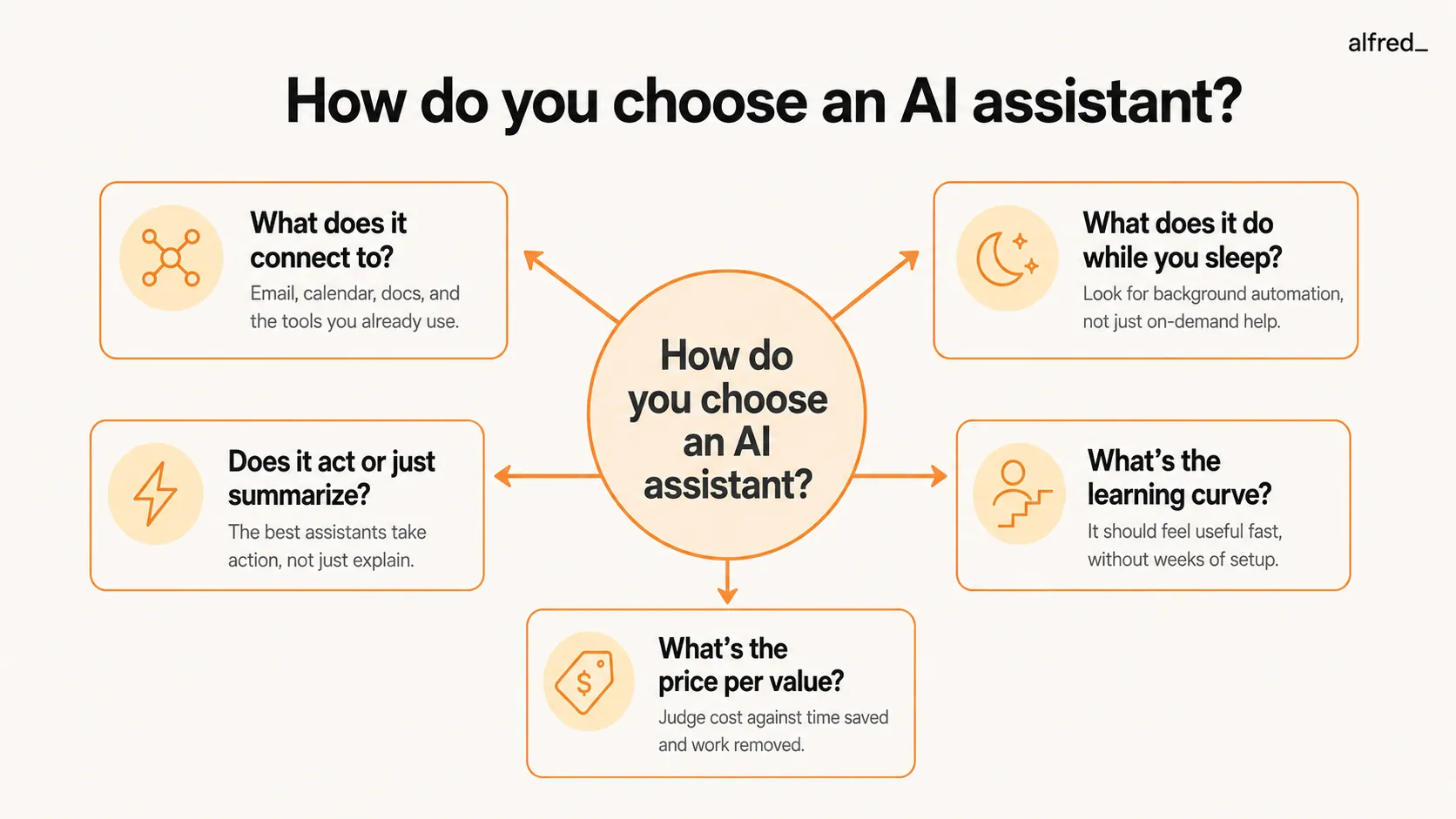
So before you compare products, you need a framework. Not “which AI assistant is best?” but “what do I actually need an AI assistant to do?”
Because here’s what nobody in this space will tell you: most AI assistants are features pretending to be products. They do one thing – summarize emails, schedule meetings, transcribe calls – and wrap it in enough marketing to sound like a full assistant. The gap between “AI-powered” and “actually useful” is enormous. And if you’re already using something that isn’t working, understanding what happens when you stop using a productivity app can help you decide whether to switch or stick.
How do you choose the right AI assistant?
- Start with what it connects to – an assistant that only sees your email can’t help with your calendar
- Ask what it does without you – the best assistants work before you start your day, not just when you click
- Distinguish between tools that summarize and tools that act – summaries are nice, actions save time
- Factor in learning curve – the best tool is the one you’ll actually use daily
- Calculate price per value, not just monthly cost – a $25/mo tool that saves 5 hours beats a $10/mo tool that saves one
The Decision Framework
1. What Does It Connect To?
An AI assistant is only as good as the data it can see. If it connects to your email but not your calendar, it can’t tell you that the “urgent” email from your client is about a meeting that’s already been rescheduled. If it sees your calendar but not your tasks, it can’t tell you that you have 3 hours of deep work blocked but nothing assigned to fill them.
The integration question isn’t “how many apps does it connect to?” It’s “does it see enough of my work to make good decisions?”
What to evaluate: Does it connect to your email, calendar, and task system at minimum? Bonus: does it see Slack, your CRM, or your project management tool?
2. What Does It Do While You Sleep?
Most AI tools wait for you to press a button. You open the app, ask a question, get an answer. That’s a search engine with a chatbot wrapper.
A real assistant works asynchronously. It triages your inbox overnight. It drafts replies to routine messages. It extracts action items from emails and puts them on your task list. When you wake up, the work is already done.
What to evaluate: Will this tool do meaningful work between the time I close my laptop and the time I open it again?
3. Does It Act or Just Summarize?
This is the dividing line in the AI assistant market right now. On one side: tools that read your email and give you a summary. On the other side: tools that read your email, draft a reply, flag the items that need your attention, and archive the rest.
Summaries feel useful in demos. In practice, reading a summary and then opening the email to reply takes longer than just reading the email. Action is what saves time.
What to evaluate: After this tool processes my input, is there less work left for me, or just a different format of the same work?
4. What’s the Learning Curve?
The most powerful tool in the world is useless if it takes 3 weeks to configure. AI assistants should reduce your workload from day one, not add a setup project to your plate.
Some tools require extensive prompt engineering. Others need you to manually create rules and filters. The best ones learn from your behavior and improve over time without instruction.
What to evaluate: Can I get value in the first 24 hours? Or do I need to “train” it before it’s useful?
5. Price Per Value
Stop comparing monthly costs. Start comparing time saved per dollar spent.
A $10/month tool that saves you 30 minutes per week gives you 2 hours per month. That’s $5/hour – less than you’d pay anyone to do anything.
A $25/month tool that saves you 5 hours per week gives you 20 hours per month. That’s $1.25/hour. For a knowledge worker billing at $100+/hour, that’s a 80x return.
What to evaluate: How many hours per week will this realistically save me? Divide the monthly cost by that number.
“The best AI assistant isn’t the smartest one. It’s the one that sees enough of your work to make decisions you trust.”
Comparing the Contenders
With that framework in mind, here’s how the major players stack up.
AI Assistant Comparison (2026)
| Feature | alfred_ ($29.99/mo) | Superhuman ($30/mo) | SaneBox ($7+/mo) | Shortwave ($30/mo) | Lindy ($29.99/mo) |
|---|---|---|---|---|---|
| Email triage | Yes | Yes | Yes | Yes | No |
| Calendar integration | Yes | Yes | No | No | Yes |
| Task extraction | Yes | No | No | No | Yes |
| Draft replies | Yes | Yes | No | Yes | Yes |
| Works asynchronously | Yes | No | Yes | No | Yes |
| Daily briefing | Yes | No | No | No | No |
| Follow-up tracking | Yes | Yes | No | No | Yes |
| Learning curve | Low | Low | Low | Medium | High |
alfred_
alfred_ is designed as a unified assistant that connects email, calendar, and tasks. It triages your inbox overnight, drafts replies to routine messages, extracts action items, and delivers a morning brief each morning with everything that needs your attention. It works before you start your day. The learning curve is low because it adapts to your patterns rather than requiring configuration. At $29.99/month with a 7-day free trial, it sits in the middle of the price range but covers more ground than any single competitor.
Strongest on: asynchronous work, cross-channel intelligence (email + calendar + tasks), morning brief
Weakest on: it’s newer than some competitors, so the ecosystem of third-party integrations is still growing
Superhuman
Superhuman is a keyboard-driven email client. Keyboard shortcuts for everything, split inbox, AI triage, snippets, scheduled send, and read statuses. What it isn’t: an assistant that works when you’re not using it. Superhuman’s AI features are reactive – they help when you’re in the app but don’t do work in the background. At $30/month, you’re paying for speed and design, not proactive assistance. And it’s email-only – no calendar intelligence, no task extraction.
Strongest on: email speed, design, keyboard-driven workflow
Weakest on: no asynchronous action, no calendar or task integration, premium price point
SaneBox
SaneBox has been filtering email since before AI was trendy. It sorts your inbox into folders – SaneLater, SaneNews, SaneBlackHole – based on learned importance patterns. It works across any email client because it operates at the server level. Simple, reliable, affordable starting at $7/month. The limitation: it only filters. No reply drafting, no task extraction, no calendar awareness. It reduces noise but doesn’t create action.
Strongest on: email filtering at the server level, works with any client, affordable
Weakest on: filtering only – no replies, no tasks, no calendar, no briefing
Shortwave
Shortwave is rebuilding the email client with AI at the core. Threaded conversations, AI search, auto-labeling, and AI-drafted replies. It offers a 14-day free trial, and paid plans now start at $30/month per seat. It’s a strong email client with genuine AI features. The gap: it’s still just email. No calendar, no tasks, no background work. And the AI features are in-app only – you need to be using Shortwave for the AI to help.
Strongest on: AI-native email client design, threaded conversations, AI search
Weakest on: email-only, no background work, AI only active when you’re in the app
Lindy
Lindy is a different kind of product. It describes itself as an AI teammate: you ask it in Slack, iMessage or email, and it works in the tools it is connected to and runs routines on a schedule, such as a daily brief or meeting notes. Paid plans start at $29.99/month (with $50 in trial credits rather than a free tier), and all of its work is metered in credits. Lindy is built around a team working in Slack.
What it covers: requests in Slack, scheduled routines, multi-tool work
Weakest on: credit-based pricing can add up
Our Recommendation
Apply the framework:
If you want a keyboard-driven email client: Superhuman, at $30/month and email only. If you want the fastest way to answer email, alfred_: you reply to clients by text, with no app to open.
If you want cheap inbox filtering: SaneBox. It’s been doing this longer than anyone and the price is right.
If you want an AI-native email client: Shortwave. Solid product, strong AI search and threading.
If you want an assistant that works across email, calendar, and tasks without configuration: alfred_. It’s the only option that combines background work, cross-channel intelligence, and a morning brief. 7-day free trial, $29.99/month after.




