

Your Calendar Is Not a Meeting Tracker, It’s a Revenue Protection System
Most professionals treat their calendar as a passive record: meetings get added, appointments get confirmed, and the calendar shows where you need to be.
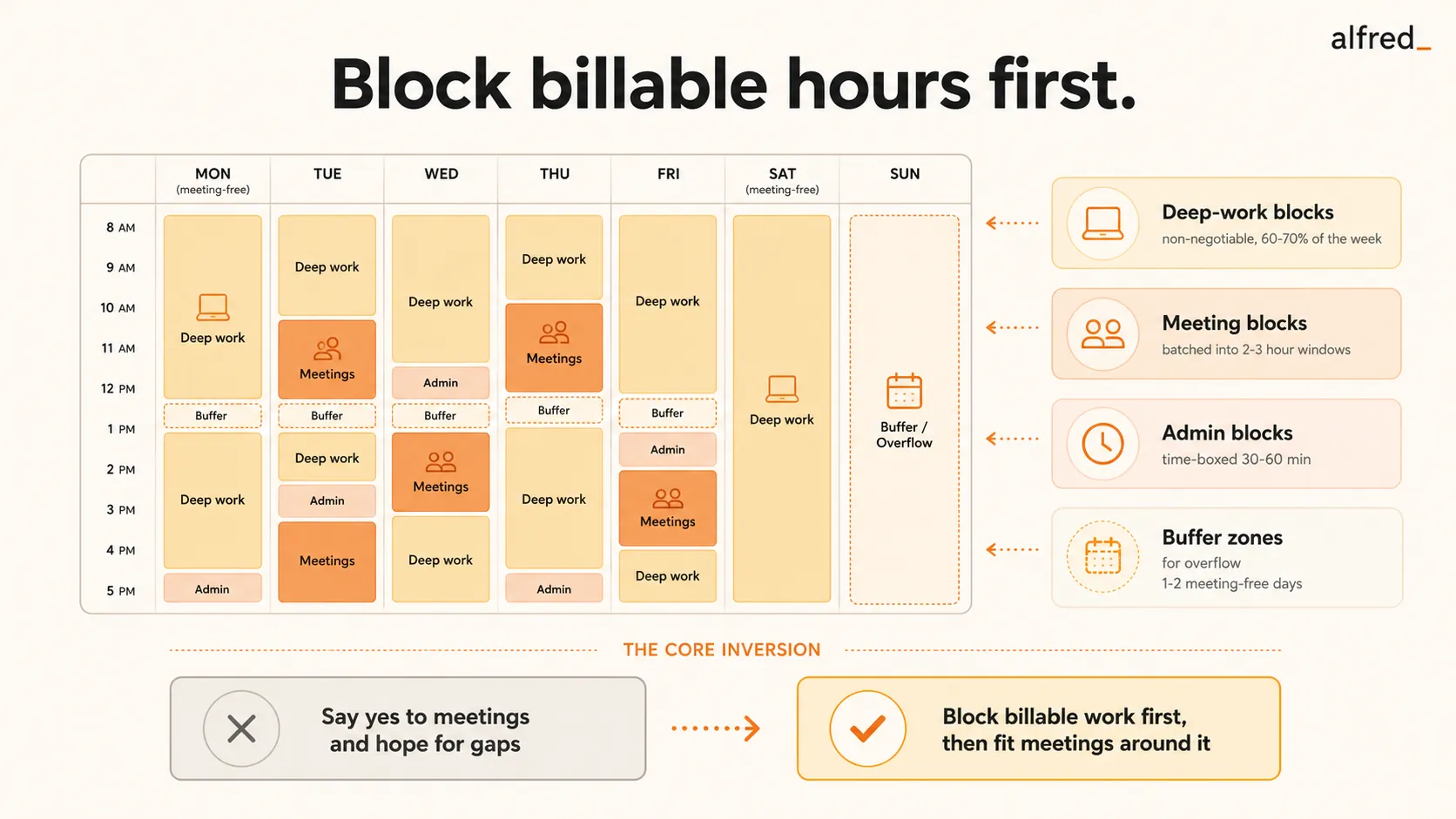
But consultants and founders whose time converts directly to income ($200–$500+/hour) don’t use their calendar this way. For them, the calendar is the single most important revenue protection tool they have.
Every hour on the calendar is either earning money or costing money. A meeting that doesn’t move work forward is lost billable time. An unprotected afternoon is an invitation for scheduling chaos. A calendar controlled by inbound requests is a calendar optimized for other people’s priorities, not yours.
The calendar isn’t just where your day lives. It’s where your revenue gets protected, or lost.
The Core Principle: Billable Hours Are Blocked First
High-earners block billable time before accepting meetings.
This is the inversion that separates consultants making $500K+ from those struggling to hit $200K. The struggling consultant says “yes” to meeting requests and hopes to find time for client work in the gaps. The successful consultant blocks client work first and fits meetings around it.
Struggling Consultant Calendar:
- Meetings scattered throughout the day
- Client work squeezed into 1-hour gaps
- Context switching every 60–90 minutes
- Deep work happens after 6pm or not at all
40 hours available → 15 hours of billable output
Successful Consultant Calendar:
- Deep work: 8am–12pm, 2pm–5pm (protected)
- Meetings batched: 12pm–2pm or 5pm–6pm
- Context switching minimized to 1–2x/day
- Deep work is default; meetings are the exception
40 hours available → 30+ hours of billable output
The difference: $45K–$90K in annual earning capacity at $300–$600/hour rates.
The 4 Calendar Zones: How High-Earners Structure Their Week
Successful consultants and founders divide their calendar into four zones, each serving a distinct economic purpose:
- Blocked in 3–4 hour chunks (minimum 2 hours)
- Protected from meeting requests (no exceptions unless revenue-critical)
- Phone on Do Not Disturb, email closed, Slack paused
- Scheduled for your peak cognitive hours (usually mornings)
- Batched into 2–3 hour windows (e.g., 12pm–2pm, 4pm–6pm)
- All meetings scheduled within these windows, no exceptions
- Reduces context switching to 1–2 times per day instead of 5–6
- Buffer time between meetings for prep and follow-up
- Scheduled in 30–60 minute blocks (morning and end-of-day)
- Never allowed to expand into deep work time
- Ideally delegated or automated (personal AI assistant handles most of this)
- Time-boxed strictly: when the block ends, admin work stops
- Scheduled as
- blocks to prevent over-scheduling
- Can be used for overflow work, unexpected client needs, or downtime
- Prevents burnout by building in breathing room
- If unused, converts to billable work or strategic thinking
Calendar Defense: How to Protect Deep Work From Meeting Creep
The biggest threat to a high-earner’s calendar is meeting creep: the slow accumulation of “just one more meeting” requests that gradually consume all deep work time.
-
- Default to “No” for Inbound Meeting Requests: Every meeting request is a potential loss of billable time. The default answer is “no” unless the meeting is revenue-generating (client work, deal closing, high-value prospect), relationship-critical (key partner, major client, urgent team issue), or time-sensitive (can't be handled async or deferred). Everything else gets deferred, delegated, or declined.
-
- Control Availability Windows: High-earners don't offer “let me know what works for you.” They offer 2–3 specific times within their meeting blocks. Instead of “I'm flexible, what works for you?” say “I have availability Thursday 12–1pm or Friday 4–5pm. Which works better?” This protects deep work blocks from getting fragmented by meetings scattered throughout the day.
-
- Use a Personal AI Assistant to Handle Scheduling: Manual scheduling is a time sink. Back-and-forth emails to find a meeting time can take 10–15 minutes and 3–4 email exchanges. A personal AI assistant handles this on its own: receives the meeting request, checks your calendar and proposes times within your meeting blocks, confirms the meeting and sends a calendar invite. Total time for you: 0 minutes.
-
- Block “Meeting-Free Days”: Many high-earners designate 1–2 days per week as meeting-free. These days are reserved exclusively for deep work, no exceptions. Common patterns: Mondays and Fridays as deep work only, Tuesday–Thursday as days when meetings are allowed in designated blocks. This ensures at least 16 hours per week of uninterrupted billable time.
Meeting Hygiene: How to Ensure Every Meeting Earns Its Spot
Not all meetings are created equal. High-earners apply strict filters to determine whether a meeting deserves calendar space.
Context Switching Is Revenue Loss: The Math
Every time you switch from deep work to a meeting and back, you lose time to context switching. Research shows it takes 23 minutes on average to regain full focus after an interruption.
The Context Switching Tax:
- Meeting at 10am (1 hour) + 23 minutes to refocus = 1h 23min lost
- Meeting at 2pm (1 hour) + 23 minutes to refocus = 1h 23min lost
- Meeting at 4pm (1 hour) + 23 minutes to refocus = 1h 23min lost
- Total: 3 hours of meetings → 4h 9min of lost productivity
- At $300/hour: $1,245 in lost capacity per day
- Weekly cost: $6,225
- Annual cost: $323,700
This is why high-earners batch meetings into 2–3 hour blocks. Instead of 4 context switches per day, they have 1–2. The difference is $250K+ in annual earning capacity. If your calendar is full but revenue isn’t growing, your calendar may be lying about your priorities.
Real-World Example: A High-Earner’s Weekly Calendar
Marcus, Independent Strategy Consultant ($500/hour)
- 8am–12pm: Client deliverable (deep work)
- 12pm–1pm: Lunch + admin block
- 1pm–5pm: Client deliverable (deep work)
- 5pm–6pm: Email review, follow-ups
- 8am–11am: Deep work (proposal writing)
- 11am–12pm: Buffer
- 12pm–2pm: Meeting block (2 client calls)
- 2pm–5pm: Deep work (analysis)
- 5pm–6pm: Admin block
- 8am–12pm: Deep work (client deliverable)
- 12pm–2pm: Meeting block (1 prospect call, 1 partner sync)
- 2pm–5pm: Deep work (strategic planning)
- 5pm–6pm: Admin block
- 8am–11am: Deep work (client deliverable)
- 11am–12pm: Buffer
- 12pm–2pm: Meeting block (client workshop)
- 2pm–5pm: Deep work (follow-up deliverable)
- 5pm–6pm: Admin block
- 8am–12pm: Deep work (strategic thinking, business development)
- 12pm–1pm: Lunch + admin
- 1pm–4pm: Deep work (proposals, content, planning)
- 4pm–5pm: Week review, next week planning
Total: 28 hours deep work, 8 hours meetings, 4 hours admin/buffer
At $500/hour: 28 hours × $500 = $14,000/week in billable capacity
How to Automate Calendar Protection
Managing a calendar this precisely requires discipline, or automation. High-earners increasingly use personal AI assistants to enforce calendar rules on its own:
- Evaluates meeting requests and proposes times only within designated meeting blocks
- Declines low-priority requests with polite explanations
- Confirms meetings, sends calendar invites, and handles rescheduling
- Protects deep work blocks from scheduling conflicts
- Prepares meeting briefs with context and recent history
The result: your calendar stays protected without constant manual intervention. Scheduling happens on its own. Deep work blocks stay intact.
Summary: Your Calendar Is Your Revenue Protection System
Consultants and founders who earn $500K+ per year don’t use their calendar to track meetings. They use it as a revenue protection system:
- Billable hours are blocked first. Meetings fit around them, not the other way around
- Deep work is scheduled in 3–4 hour chunks to minimize context switching
- Meetings are batched into designated blocks (12pm–2pm, 4pm–6pm)
- Meeting-free days (Mondays/Fridays) protect 16+ hours per week for deep work
- Every meeting is filtered: does it generate revenue, protect deals, or build critical relationships?
The calendar isn’t passive. It’s the tool that determines whether you earn $200K or $500K this year. Understanding how founders think about time reveals why protecting calendar time is the highest-leverage move you can make.




