


Most high-value professionals do not have a productivity problem. They have a coordination problem. The work itself, the advice, the deals, the deliverables, is the part they are good at and paid for. What drains them is everything around it: the triage, the scheduling back-and-forth, the follow-ups, the commitments half-remembered from a meeting three days ago. They reach for another app, get a little faster, and stay just as buried, because faster is not the same as removed. A personal operating system is the shift from doing the coordination quicker to not doing it at all. Here is what that actually consists of, how it differs from the tools you already own, and who it is genuinely for.
The Direct Definition
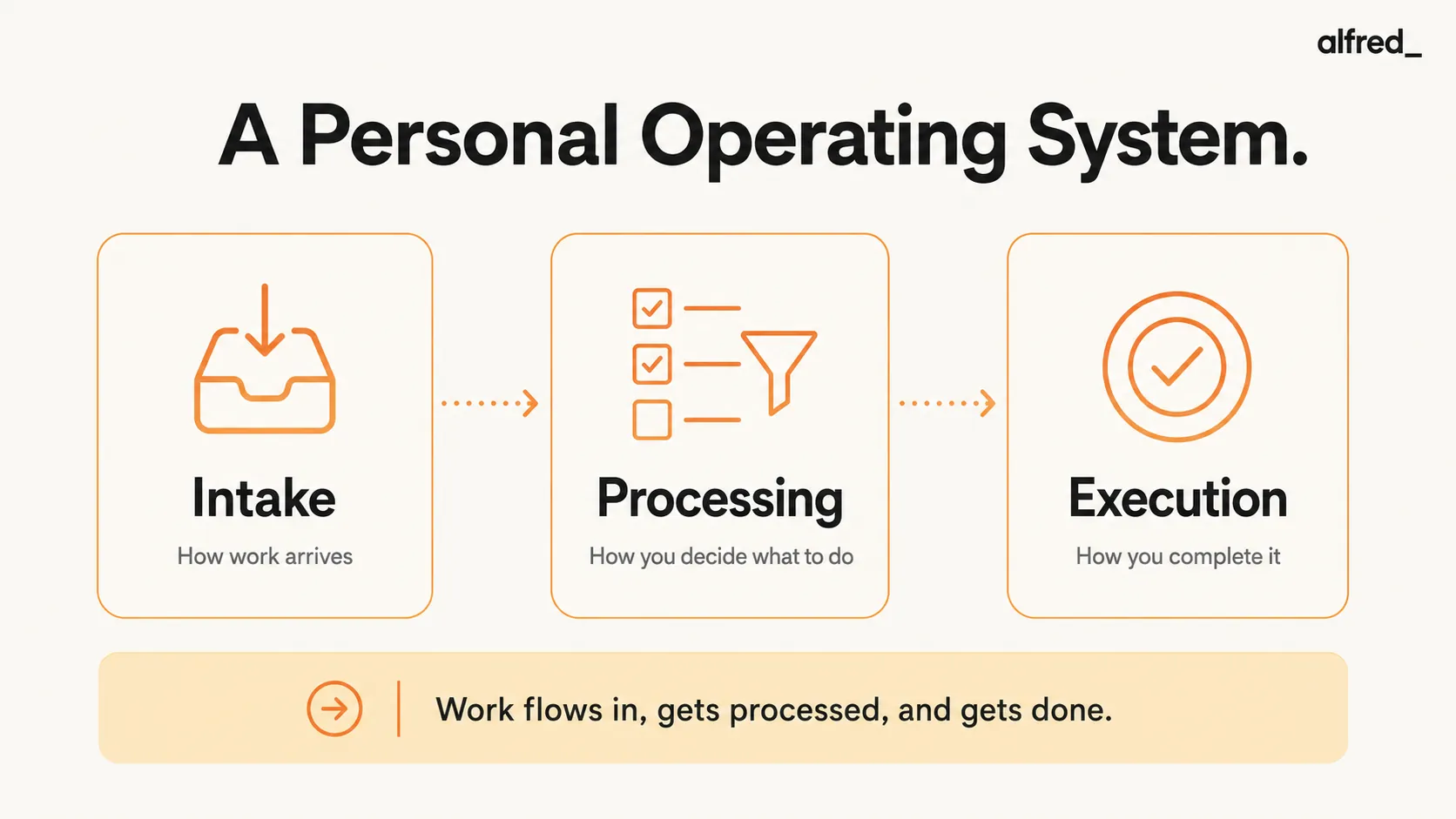
A personal operating system is the integrated set of tools, processes, and automated systems that handle how work flows to you, how you process it, and how you execute.
This is not a single app, productivity technique, or organizational framework. A personal operating system is the entire architecture of how you handle professional demands, from the moment a message arrives to the moment a commitment is fulfilled.
Most professionals don’t have a personal operating system. They have a collection of disconnected tools (email client, calendar app, task manager, note-taking software) held together by manual effort and memory. A true personal operating system integrates these components, creating a unified email, calendar, and task system, and automates the coordination between them.
The Three Layers of a Personal Operating System
A functional personal operating system operates across three layers:
Layer 1: Intake (How Work Arrives)
This layer handles how information and requests reach you. For most professionals, intake happens through:
- Email (requests, commitments, information, follow-ups)
- Calendar invites (meeting requests, time commitments)
- Messages (Slack, Teams, text messages)
- In-person or verbal commitments
Without a system: You manually check each source, decide what’s urgent, and try to remember commitments. Every intake channel requires active attention.
With a personal operating system: Incoming work is automatically triaged, categorized, and routed based on urgency, source, and context. High-priority items surface immediately. Low-priority items are deferred or archived. You see only what requires your judgment.
Layer 2: Processing (How You Decide What to Do)
This layer determines how you evaluate incoming work and convert it into action. Processing includes:
- Deciding which emails require responses
- Extracting commitments and deadlines from messages
- Scheduling meetings and blocking time
- Prioritizing competing demands
Without a system: Processing is manual. You read every email, identify action items yourself, manually add tasks to a list, and try to remember what you agreed to in meetings. Processing consumes 10-15 hours per week.
With a personal operating system: Processing is automated. Commitments are extracted from emails and meetings. Deadlines are tracked. Follow-ups are surfaced before they’re late. You approve decisions, but you don’t do the processing.
Layer 3: Execution (How You Complete Work)
This layer governs how you actually do the work. Execution includes:
- Drafting responses to emails
- Preparing for meetings
- Delivering on commitments
- Following up on outstanding items
Without a system: Execution is reactive. You respond to whatever is most recent or most urgent. Deep work gets interrupted. Commitments slip because there’s no tracking.
With a personal operating system: Routine execution is handled autonomously (email drafts, meeting confirmations, follow-up reminders). Complex execution is supported with context and preparation. You focus only on work that requires your expertise or judgment.
Personal Operating System vs. Productivity Tools
The term “productivity tool” describes software that helps you complete specific tasks faster. A personal operating system is fundamentally different.
Productivity Tool
- Single-purpose (email client, task manager, calendar app)
- Speeds up manual work (keyboard shortcuts, templates, filters)
- You still do all the coordination (checking apps, moving information, deciding priorities)
- Tools don’t talk to each other. You connect them manually
Result:
You’re faster at tasks, but you’re still doing all the tasks.
Personal Operating System
- Multi-layer integration (email, calendar, tasks, follow-ups work together)
- Removes work entirely (automated triage, drafting, scheduling, tracking)
- You approve high-stakes decisions, coordination happens automatically
- Systems are aware of each other, commitments in email become tasks, meetings generate follow-ups
Result:
You reclaim 10-15 hours per week by removing tasks from your plate.
What a Functional Personal Operating System Does
A well-designed personal operating system handles the coordination work that consumes 15-20 hours per week for high-value professionals:
1. Autonomous Email Triage
Your system automatically separates urgent messages from noise, identifies action items, and defers low-priority emails. Instead of processing 50+ messages daily, you see 5-10 that require your judgment.
2. Commitment Extraction and Tracking
When you agree to deliver a proposal, meet a deadline, or follow up with a prospect, your system extracts that commitment and tracks it. Follow-ups surface before they’re late. You never lose a deal because you forgot to respond.
3. Meeting Coordination Without Back-and-Forth
Your system proposes meeting times based on your calendar, confirms availability, sends invites, and reschedules conflicts autonomously. You approve the meeting, everything else is handled.
4. Context-Aware Response Drafting
Your system drafts responses to routine emails based on past patterns. You review and approve, but you don’t write from scratch. This saves 5-10 hours per week on email alone.
5. Proactive Time Protection
Your system blocks time for deep work based on your priorities. When meeting requests arrive, the system evaluates them against your protected time and proposes alternatives if they conflict with high-leverage work.
Who Needs a Personal Operating System
Not everyone needs a personal operating system. Most salaried employees with low coordination overhead can function with basic productivity tools.
Personal operating systems are designed for professionals whose time converts directly to income or high-leverage output:
Independent Consultants
Consultants billing $200-$500/hour lose $156K-$520K annually to coordination work. A personal operating system reclaims those hours for billable work and business development.
Founders and CEOs
Founders lose 15-20 hours per week to email, scheduling, and follow-ups, time that should go toward closing deals, strategic decisions, and building the business. A personal operating system ensures nothing slips and gives hours back for revenue-generating work.
Small Firm Partners
Partners at consulting, legal, or advisory firms lose 20+ hours per week to coordination. At $250-$600/hour rates, that’s $260K-$624K in lost annual capacity. A personal operating system handles the busywork so partners can focus on client delivery.
Personal operating systems are NOT for:
- Casual users seeking “life hacks”
- Salaried employees with minimal email and coordination overhead
- Anyone looking for a single app to “get organized”
- People who don’t lose significant revenue to coordination work
Building a Personal Operating System: The Components
A functional personal operating system requires integration across multiple components:
Email Management Layer
This is not an email client. It’s an automated system that triages, drafts, and tracks email communications. It reduces your inbox to only what requires your judgment.
Calendar Coordination Layer
This layer handles meeting scheduling, conflict resolution, and time blocking. It ensures your calendar protects your highest-leverage work instead of filling with reactive commitments.
Task and Commitment Tracking Layer
This system extracts commitments from email, meetings, and conversations, tracks deadlines, and surfaces follow-ups proactively. You don’t add tasks manually. They’re identified automatically.
Context and Memory Layer
This layer maintains history across conversations, projects, and relationships. When you’re preparing for a meeting, the system surfaces past discussions, commitments, and relevant context automatically.
Automation and Workflow Layer
This is the intelligence that connects everything. It routes incoming work, triggers actions based on conditions, and operates autonomously based on your patterns and priorities. This is where AI agents that coordinate across tools become essential.
Real-World Example: A Day With vs. Without a Personal Operating System
Without a Personal Operating System
8:00 AM: Check email, 47 unread messages. Spend 90 minutes reading, deciding, and responding.
9:30 AM: Realize you forgot to follow up with a prospect from last week. Send apologetic “just checking in” email.
10:00 AM: Five-way email thread trying to schedule a meeting. Everyone proposes different times. Takes 15 minutes to find a slot that works.
11:00 AM: Start deep work. Interrupted by urgent email. Lose focus. Takes 23 minutes to recover concentration.
2:00 PM: Realize you double-booked meetings. Frantically reschedule one.
5:00 PM: Spent 3+ hours on email. Deep work session was fragmented. Revenue-generating work got pushed to evening.
With a Personal Operating System
8:00 AM: Check email, 5 messages flagged as urgent. 42 others triaged and handled. 8 draft responses await approval. Total time: 12 minutes.
8:15 AM: System reminds you to follow up with prospect. Draft already prepared based on previous conversation. You approve and send. Total time: 2 minutes.
9:00 AM: Meeting request arrives. System proposes three times based on your availability, sends options, confirms when prospect replies. You see confirmation. Total time: 0 minutes.
10:00 AM - 1:00 PM: Uninterrupted deep work. System handles incoming messages and surfaces only critical items.
2:00 PM: System detects calendar conflict and proactively reschedules the lower-priority meeting. You approve the change.
5:00 PM: Spent 30 minutes on email. Three hours of deep work completed. Evening is free.
The Economic Logic: Why Personal Operating Systems Matter
Personal operating systems aren’t about convenience or feeling organized. They’re about revenue protection and time reclamation.
Conservative ROI Math:
- Average professional loses 15-20 hours/week to coordination work
- A personal operating system reclaims ~15 hours/week = 60 hours/month
- At $200/hour billing rate: 60 hours × $200 = $12,000/month in recaptured earning capacity
- At $300/hour: $18,000/month
- At $500/hour: $30,000/month
The question isn’t “Can I afford a personal operating system?” It’s “Can I afford to keep losing $12K-$30K per month to coordination work?”
How to Evaluate a Personal Operating System
If you’re evaluating tools that claim to provide a “personal operating system,” here’s what to look for:
1. Cross-Tool Integration
Does it connect email, calendar, tasks, and commitments? Or is it just a single-purpose app with marketing language?
2. Autonomous Operation
Does it act proactively, or does it wait for your input? Real operating systems work 24/7 without requiring you to check in.
3. Time Reclamation Metric
Does it give you hours back, or does it just make you faster at tasks? If you’re not reclaiming 10-15 hours per week, it’s not an operating system. It’s software.
4. Revenue Protection
Does it ensure nothing slips? No missed follow-ups, no lost deals, no commitments forgotten? Revenue protection is the entire point.
Where alfred_ Fits
Everything above describes an architecture, not a product, and you can assemble it yourself from rules, filters, and disconnected apps held together by your own attention. The catch is that the glue is you, and you are the bottleneck the system was supposed to remove. The integration layer, the part that triages intake, extracts commitments, drafts the routine responses, and surfaces only what needs your judgment, is the hard part to build and the whole point of having it.
That integration layer is what alfred_ is. It sits across your email, calendar, and tasks as a single coordinated system rather than another app you have to check, handling the intake and processing layers autonomously and handing you only the decisions that actually require you. It is the most direct way to get a personal operating system without spending months wiring one together by hand, and it improves as it learns how you work. The point was never another tool. It was getting the coordination off your plate, which is exactly the job alfred_ is built to do.
Summary: What a Personal Operating System Actually Is
A personal operating system is the integrated set of tools, processes, and automated systems that handle how work flows to you, how you process it, and how you execute.
It operates across three layers: intake (how work arrives), processing (how you decide what to do), and execution (how you complete work). Each layer is automated and integrated with the others.
Personal operating systems are built for high-value professionals whose time converts to income. They reclaim 10-15 hours per week by removing coordination work entirely, not just organizing it.
If your “productivity system” is a collection of disconnected apps held together by manual effort, you don’t have an operating system. You have software.