

Why Meeting Notes Fail
The purpose of meeting notes is not to record what was said. It’s to capture what was decided and who is doing what by when, and to make follow-up inevitable rather than optional.
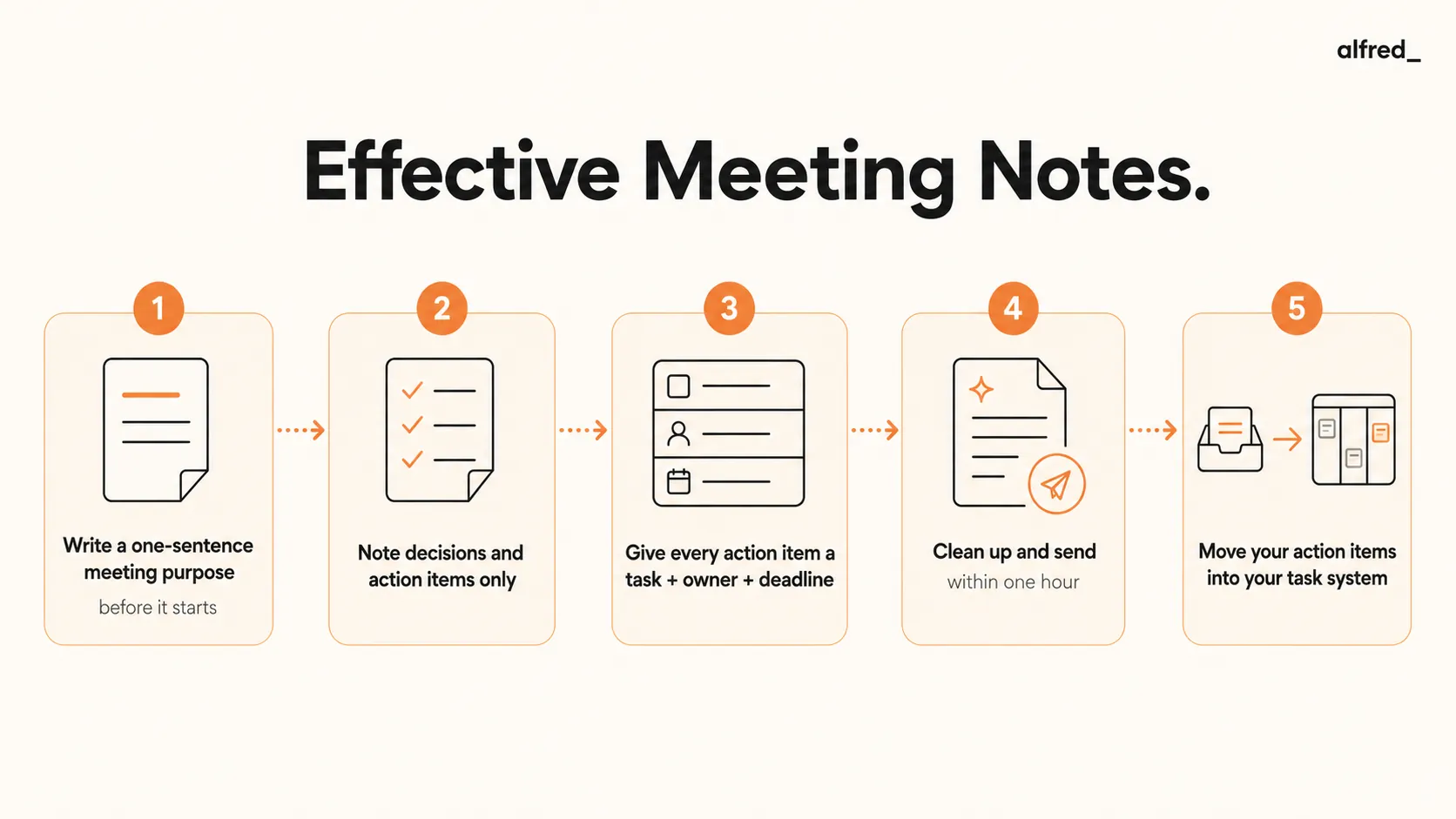
Most notes fail for a specific reason: they capture discussion, not decisions. Someone types furiously for 45 minutes and produces a document that accurately reflects the conversation but contains zero actionable information. Three days later, nobody can remember what was actually agreed, and the meeting effectively never happened.
David Allen’s foundational insight applies directly here: “Your mind is for having ideas, not holding them.” Meeting notes are an externalization of memory, but only if they capture what the brain actually needs to recall. The brain needs to recall decisions and commitments, not the reasoning that led to them. The reasoning lived its useful life in the room.
“Your mind is for having ideas, not holding them.” David Allen, Getting Things Done
Andy Grove made the same point from the manager’s perspective. In his notes on one-on-ones, Grove was explicit: the notes from a one-on-one should capture what was discussed, what decisions were made, and what the next action is. And crucially, the subordinate owns this documentation, not the manager. Ownership of the notes signals ownership of the follow-through.
54%
of workers frequently leave meetings without a clear idea of the next steps or who owns each task
AtlassianThe Anatomy of Useful Meeting Notes
Before the format matters, the content requirements must be clear. Every set of meeting notes that drives action contains exactly these elements:
The Six Required Elements
- Meeting name and date: Basic metadata (sounds obvious, but becomes critical when searching later)
- Attendees: Who was in the room determines who is accountable for what was agreed
- Context: One sentence: what problem were we solving? Why did this meeting exist?
- Decisions made: Specific, not vague. “We decided to launch in Q2” not “We discussed timeline options”
- Action items: Task + owner by name + deadline. Every single one. No orphaned tasks.
- What was NOT decided: The questions still open, and who will resolve them by when
Notice what’s absent: the discussion itself. The reasoning that led to the decision. The alternative options considered. The tangential conversation that was interesting but unresolved. None of that belongs in effective meeting notes. It belongs in a separate document if it belongs anywhere.
The Grove One-on-One Note Format
Andy Grove’s High Output Management contains one of the most practical frameworks for one-on-one meeting notes. Grove’s principle was that the subordinate owns the agenda and the notes. This is not a clerical assignment but a signal about who is responsible for the outcomes of the meeting.
One-on-one notes in the Grove format should capture four things:
- What happened since last time (brief status update, one sentence per project)
- Decisions made in this meeting (with any necessary context)
- Commitments made by each party (manager’s commitments included, not just the subordinate’s)
- Seeds for the next meeting’s agenda (issues that need more time, follow-ups that need tracking)
Grove also noted something counterintuitive about the rhythm of one-on-ones: the most important topics (what he called “heart to heart” items) typically don’t surface until 20-30 minutes into the conversation. This means note-taking should remain light during the opening exchange. The early minutes are warm-up. The substantive content comes later, and that’s when capturing matters most.
“The one-on-one is the subordinate’s meeting. The manager is there to listen, coach, and remove obstacles, not to direct.” Andy Grove, High Output Management
The Bezos Approach: Write Before the Meeting, Not After
Jeff Bezos banned PowerPoint at Amazon and replaced it with a requirement that substantive meetings begin with a six-page narrative memo, read silently by all attendees for 30 minutes at the meeting’s start. The rationale: “You can hide a lot of sloppy thinking behind bullet points.” A written narrative forces structured reasoning. Bullet points allow disconnected fragments to masquerade as coherent thought.
“When you force someone to write their thinking down, you force them to clarify it.” Jeff Bezos
You don’t need to write a six-page memo for every meeting. But the underlying principle applies universally: if you write a brief agenda and define the expected decisions before the meeting, your notes during the meeting become dramatically more focused. You’re no longer recording an open conversation. You’re annotating a structure that already exists.
Applied practically: send a three-bullet pre-meeting note with every invite that states (1) why we’re meeting, (2) what decision we need to make, and (3) any pre-read required. Your meeting notes then become the answer to question two, plus any action items that resulted.
Allen’s Capture, Clarify, Organize Framework Applied to Meetings
David Allen’s five-step Getting Things Done methodology maps cleanly onto the meeting note lifecycle. Most people practice only the first step and wonder why nothing gets done.
During the meeting, Capture: Take raw notes without filtering. Don’t try to write clean notes in real time. Don’t decide what’s important yet. Just get it down. The quality of your capture is limited by your ability to listen while writing, so capture fragments, keywords, and decision markers, not full sentences.
Immediately after, Clarify: What are the actual decisions? What are the actual next actions? Everything else in your raw notes is context, not content. The clarify step is where you translate “we talked about the timeline” into “Sarah will deliver the project plan by March 1st.” This step is often skipped, which is why most notes are useless.
Before you leave your desk, Organize: Add your action items to your task system. Send the cleaned notes to all attendees. File the raw notes if you need them for reference. The organize step must happen the same day, ideally the same hour, because context decays fast.
Allen’s rule: never re-read a piece of captured information without processing it. If you’re looking at your raw meeting notes tomorrow, you’ve already lost the clarify window.
Step-by-Step: Take Meeting Notes That Drive Action
1. Write a One-Sentence Meeting Purpose Before It Starts
Before the meeting begins, write: “By the end of this meeting, we will have [specific decision or outcome].” This shapes everything you capture. It tells you what’s signal and what’s noise. A meeting without a defined purpose produces notes without useful content.
If you can’t write the sentence, the meeting may not be ready to happen. Send it back as a pre-meeting document instead.
2. During the Meeting: Note Decisions and Action Items Only
Skip detailed discussion summaries. When someone makes a decision, write it immediately with a marker: [DECISION]. When someone commits to an action, write it with [ACTION]. Everything else (analysis, alternatives considered, context) can be ignored unless it directly enables someone to execute a decision.
This will feel incomplete in the moment. When you read it afterward, it will feel like exactly what you needed.
3. For Every Action Item: Task + Owner Name + Deadline
This is the rule that separates notes that produce action from notes that produce nothing. Every action item requires three fields: the specific task (not “follow up on this” but “send the revised proposal to [client]”), the person responsible by name (not “the team” or “we”), and a specific deadline (not “soon” or “next week” but a date).
If you end a meeting with an action item that has no owner or no deadline, you don’t have an action item. You have a wish.
4. Within One Hour: Clean Up and Send to Attendees
Don’t wait until end of day. Context degrades fast, and the value of shared notes is highest immediately after the meeting. Clean up means: remove the discussion noise, format the decisions list, format the action items list, and send. This should take 10-15 minutes, not an hour.
Sending notes also serves a social accountability function: people are more likely to execute action items they see in writing, distributed to the group.
5. Move Your Action Items Into Your Task System Immediately
Action items that live only in the notes document are not action items. They are archived intentions. Move every action item you own into your trusted task system (Allen’s term for any system that is Comprehensive, Current, Clear, and Accessible) before you close the document.
This is the step that makes follow-up inevitable. When your task system includes every commitment from every meeting, your weekly review catches everything.
Meeting Notes Templates
Three templates for the most common meeting types. Copy the structure; adapt the content to your context.
Standard Meeting Notes
Meeting: [Name] Date: [Date] | Attendees: [Names] Purpose: By end of this meeting, we will have [decision/outcome] DECISIONS - [Decision 1 (specific and final)] - [Decision 2] ACTION ITEMS - [ ] [Task description] | Owner: [Name] | Due: [Date] - [ ] [Task description] | Owner: [Name] | Due: [Date] OPEN QUESTIONS (not decided) - [Question] → [Who resolves it] by [date] Next Meeting: [Date] | Agenda Seed: [Topic to carry forward] ### One-on-One Meeting Notes (Grove Format) One-on-One: [Name] + [Manager] Date: [Date] | Prepared by: [Subordinate, always] SINCE LAST TIME - [Project]: [One-sentence status] - [Project]: [One-sentence status] DECISIONS MADE TODAY - [Decision with context] COMMITMENTS - [Subordinate]: [Specific task] by [date] - [Manager]: [Specific task] by [date] AGENDA SEED FOR NEXT TIME - [Issue that needs more time or follow-up] ### Decision Meeting Notes Decision Meeting: [Topic] Date: [Date] | Decision-makers: [Names] | Input providers: [Names] THE DECISION REQUIRED [One sentence stating what needed to be decided] DECISION MADE [The specific decision, stated unambiguously] Decided by: [Who made the final call] Effective: [When this decision takes effect] RATIONALE (brief) [One paragraph max: why this option over alternatives] ACTION ITEMS RESULTING - [ ] [Task] | Owner: [Name] | Due: [Date] REVISIT TRIGGER (when would we reconsider this decision?) [Condition or date] ## How alfred_ Handles Meeting Follow-Up The most common failure point in the note-to-action cycle is the gap between “meeting ends” and “follow-up email sent.” Even with excellent notes, people get pulled into the next thing before they send the summary, and by end of day the notes feel stale and the follow-up never happens.
alfred_ connects to your calendar and monitors your meetings. After a meeting ends, alfred_ drafts a follow-up email with the key discussion points and action items based on the context it has from your calendar, the meeting invite, and any relevant prior email threads. You review the draft, add the specific action items from your notes, and send. The note-to-follow-up cycle becomes automatic rather than aspirational.
alfred_ also extracts action items from emails, including the follow-up summaries you receive from others, and can add them to your task queue so that commitments from other people’s meetings don’t fall through the cracks either.