

The meeting ends, everyone nods at the action items, and then nothing happens. No one writes the recap, the decisions blur by Thursday, and the thing you all agreed to do quietly dies. The follow-up email is what turns a conversation into commitments, and it is exactly the task that loses every time to the next meeting starting. The fix is not more discipline about sending recaps. It is to have the draft waiting for you the moment the call ends. Here is how to automate meeting follow-ups so the action items survive the walk back to your desk.
Why Meeting Follow-Ups Fail
You finish a one-hour meeting. There were decisions made, tasks assigned, and next steps discussed. Then everyone gets up and goes back to their desks. Their inboxes are waiting. Their next meeting is in 20 minutes. The follow-up email, the one that would have captured everything, never gets written.
This isn’t a discipline problem. It’s a time and memory problem. By the time you have a free moment to write the follow-up, you’ve forgotten 40% of what was said. The action items you thought were crystal clear are now fuzzy. The person you thought was owning the deliverable might be thinking you were.
The result is predictable: things fall through the cracks. Projects stall. Decisions get re-litigated in the next meeting because nobody wrote anything down. The follow-up email, when it finally arrives (if it arrives), is vague and incomplete.
23 hrs/wk
the average time executives now spend in meetings, up from under 10 hours in the 1960s, which makes every wasted follow-up expensive
Why Meeting Follow-Ups Matter
A follow-up email isn’t just a courtesy. It’s the mechanism that converts a discussion into actual work. Without it, the meeting was essentially a conversation with no record, no accountability, and no forward motion.
A well-written follow-up email does four things simultaneously:
- Creates a written record so there’s no ambiguity about what was decided
- Assigns ownership so every action item has a name attached to it
- Sets deadlines so each task has a due date, not a vague “soon”
- Holds everyone accountable because the email is cc’d to all attendees, so everyone sees who owns what
Research consistently shows that teams with written follow-ups complete significantly more of their meeting commitments than teams without them. The gap is large enough to meaningfully affect project delivery speed and team trust.
What a Good Meeting Follow-Up Includes
Most follow-up emails fail because they’re either too vague (“Great meeting, let’s follow up on the things we discussed”) or too long (a wall of text nobody reads). An effective follow-up has a specific structure:
Anatomy of a Good Follow-Up Email
- Subject line: Specific and scannable, e.g., “Follow-up: [Meeting Name], [Date]”
- Key decisions: Bullet list of decisions made during the meeting, not a narrative
- Action items with owners: Each task on its own line, with the person’s name and the due date
- Next meeting: If applicable, when the group meets again and what needs to be ready
- Short close: One sentence inviting questions or corrections
The follow-up should arrive within 24 hours of the meeting, ideally within 2 hours while everyone still remembers the context. After 24 hours, attention has moved on and the follow-up loses most of its impact.
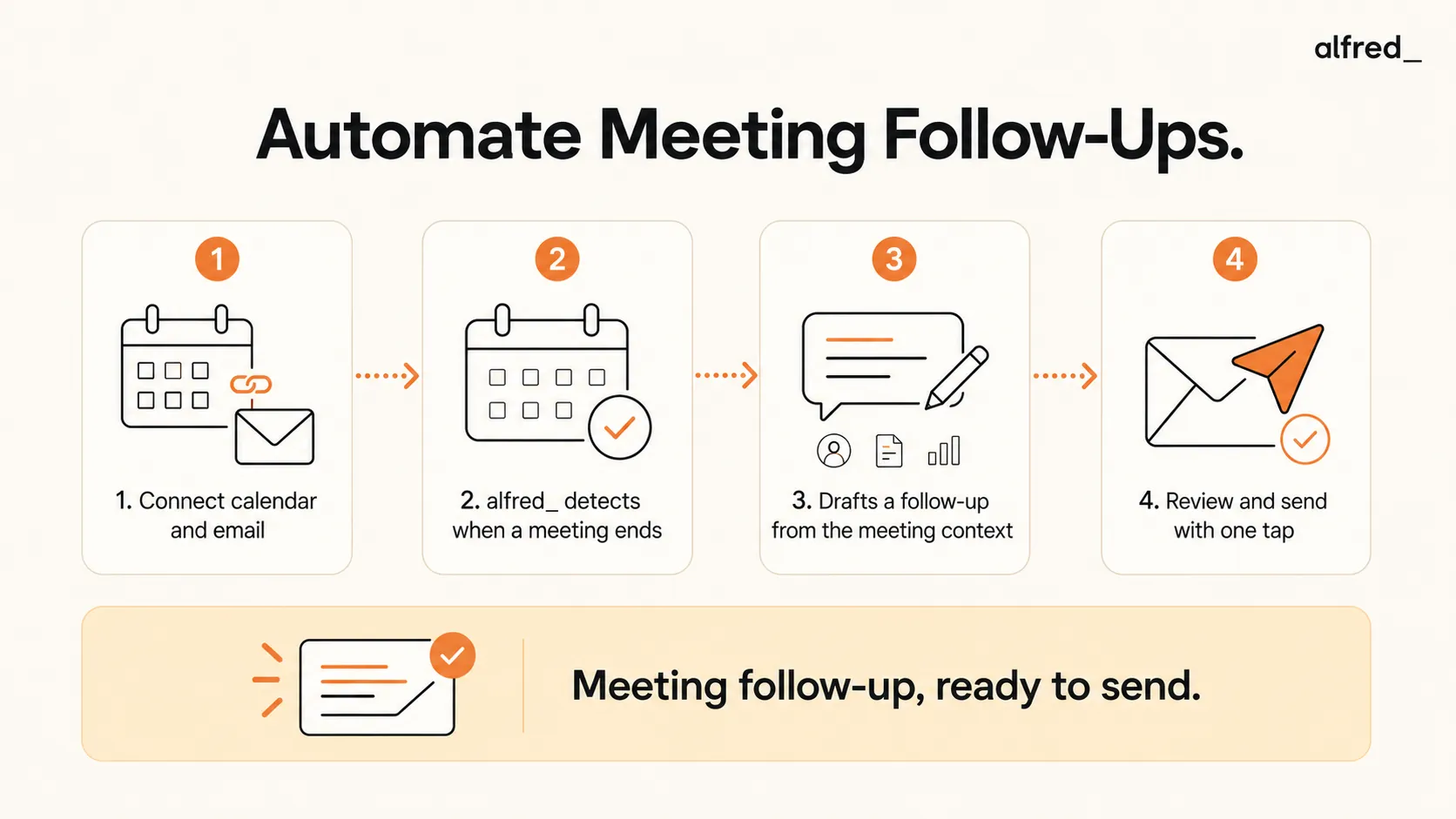
Step-by-Step: Automate Meeting Follow-Ups with alfred_
1. Connect Your Calendar and Email to alfred_
Sign up for alfred_ and connect both your email account and your calendar. alfred_ needs both to draft useful follow-ups:
- Go to get-alfred.ai/signup
- Connect Gmail or Outlook (takes about 60 seconds)
- Connect Google Calendar or Outlook Calendar
- alfred_ immediately begins monitoring your calendar for upcoming and completed meetings
Your emails and calendar data stay in Gmail/Outlook/Google. alfred_ reads and analyzes them but does not store the raw content.
2. alfred_ Monitors Your Calendar and Detects When Meetings End
alfred_ watches your calendar in real time. The moment a meeting’s scheduled end time passes, it triggers the follow-up drafting process. It uses:
- The meeting title and description from your calendar invite
- The list of attendees and their email addresses
- Any prior email threads related to the meeting topic
- The meeting organizer (to determine who should send the follow-up)
You don’t need to do anything. alfred_ handles the detection automatically.
3. alfred_ Drafts a Follow-Up Based on Meeting Context
Using everything it knows about the meeting, alfred_ generates a complete draft follow-up email that includes:
- A clear, specific subject line
- A brief summary of the meeting purpose
- Key decisions made (inferred from the meeting context and prior threads)
- Action items with suggested owners based on attendees
- Next steps with suggested dates
- A professional close
The draft is waiting for you the moment you close the meeting window. You don’t need to remember a thing.
4. Review and Send with One Tap
Open alfred_ after your meeting and find the draft ready. Review it in 60 seconds, edit anything personal or nuanced, and send.
- Read the draft: alfred_ pre-fills the key points, action items with owners, and next steps
- Edit and personalize: Add anything context-specific that only you would know
Either way, the follow-up goes out while the meeting is still fresh, not 3 days later when everyone has moved on.
Before vs. After: What This Actually Changes
Before: Manual Follow-Ups
- 2:00 PM: Meeting ends. Three action items discussed, owners unclear.
- 2:05 PM: Back at desk. Inbox has 24 new emails. Forget about the follow-up for now.
- 4:30 PM: Remember you were going to write the follow-up. Memory is already hazy.
- 4:45 PM: Write a vague summary. Not sure who owns what. Guess at deadlines.
- 5:00 PM: Send it. The email is better than nothing but doesn’t actually drive accountability.
- Next week: Meeting reconvenes. Half the action items weren’t done. Nobody’s sure who was responsible.
Result: 45 minutes of effort, follow-up still doesn’t do its job
After: Automated Follow-Ups with alfred_
- 2:00 PM: Meeting ends.
- 2:01 PM: alfred_ detects meeting ended, starts drafting.
- 2:05 PM: Open alfred_. Draft follow-up is ready: key decisions, action items with names, next steps with dates.
- 2:06 PM: Review the draft. Add one specific note. Tap Send.
- 2:07 PM: Follow-up sent. All attendees have a clear record while the meeting is still fresh.
- Next week: Everyone came prepared. Action items were done. Meeting takes half the time.
Result: 60 seconds, follow-up drives actual accountability
What alfred_ Includes in the Follow-Up
Here’s what a typical alfred_-generated follow-up looks like:
Subject: Follow-up: Q1 Marketing Planning, February 18 Hi team, Thanks for joining today's Q1 Marketing Planning session. Here's a summary to keep us aligned. Key decisions made: - We're proceeding with the March product launch on the original date - Budget for paid acquisition will increase by 20% in Q1 - Brand refresh will be reviewed at the next all-hands Action items: - Sarah: Finalize ad creative brief, due Feb 25 - Marcus: Pull Q4 performance benchmarks for comparison, due Feb 22 - Alex: Schedule brand review session with leadership, due Feb 24 Next meeting: March 3 at 2pm. Please have campaign drafts ready for review. Questions or corrections? Reply to this thread. ## Works with All Major Calendar Systems alfred_ integrates with the calendar tools your team already uses:
Calendar Integrations
- Google Calendar
- Microsoft Outlook Calendar
- Office 365 Calendar
Meeting Platforms
- Zoom (meeting detected via calendar invite)
- Google Meet
- Microsoft Teams
- In-person meetings (detected from calendar)
alfred_ doesn’t require access to the meeting recording or transcript. It uses the calendar invite metadata, attendee list, and prior email context to generate a useful follow-up. This means it works equally well for in-person meetings, video calls, and phone calls.
Beyond Follow-Ups: What Else alfred_ Automates
Meeting follow-ups are one piece of the administrative work that buries most professionals. alfred_ handles the broader picture:
- Email triage: alfred_ categorizes your inbox automatically, surfacing only what needs your attention. See how to automate email triage for the full setup guide.
- Draft replies: For any email needing a response, alfred_ prepares a draft based on the thread context, your writing style, and the sender’s history.
- Task extraction: Action items buried in emails (“Can you send me the report by Friday?”) get automatically added to your task list.
- Delegation tracking: When you send tasks to others, alfred_ monitors whether they respond and alerts you if a deadline is approaching without a reply.
- morning brief: Every morning, alfred_ delivers a summary of what needs your attention that day: emails, tasks, meetings, and follow-ups, all in one place.
The goal is simple: you handle decisions and relationships. alfred_ handles everything else. Meeting follow-ups are where most teams start because the ROI is immediate and obvious.




