

The Real Cost of Scheduling by Email
A five-email scheduling chain doesn’t cost five minutes. It costs the attention overhead of five context switches scattered across two days. Cal Newport’s research, drawing on Sophie Leroy’s work on attention residue, makes this explicit: “Even if a shift in attention is brief, think twenty seconds in an inbox. It’s enough to leave behind a residue that reduces your cognitive capacity for a non-trivial amount of time.”
That means every “Does Thursday work?” reply that pulls you out of deep work costs not the thirty seconds it takes to read and respond, but the ten-to-twenty minutes it takes your brain to fully re-engage with the work you were doing before. Five such interruptions in a morning can destroy the cognitive equivalent of two hours of focused work.
3-4 hrs
per week that 1 in 4 workers spend just scheduling meetings, before any meeting actually happens
Andy Grove frames this in terms of leverage: every email in a scheduling chain is low-leverage activity. It consumes time without producing anything. No decision is made, no work is advanced, no relationship is deepened. In Grove’s framework from High Output Management, a manager’s output is the output of their organization. Time spent in the scheduling loop is time taken from activities that actually generate that output.
Why Calendar Invites Alone Don’t Solve It
Most professionals have calendars. Most still negotiate time via email. The problem isn’t the tool; it’s the workflow. People can see their own availability but not others’, so they default to asking. Or they send a calendar invite without confirming availability first, which triggers a counter-proposal, which triggers a reply, which lands you back in the chain.
Peter Drucker diagnosed a version of this in The Effective Executive: unnecessary coordination is a symptom of “malfunction in information.” When people can’t see what they need to see, they ask. The fix is not to remind people to use their calendars. It’s to change what information flows automatically.
“Meetings are by definition a concession to deficient organization. For one either meets or one works. One cannot do both at the same time.” Peter Drucker, The Effective Executive
If scheduling a meeting already requires three exchanges before it’s booked, you’ve had a meeting about a meeting. Drucker would not be pleased.
The Meeting Scheduling Stack That Eliminates Back-and-Forth
There isn’t one trick that solves scheduling friction. There’s a stack of principles that together make back-and-forth structurally impossible.
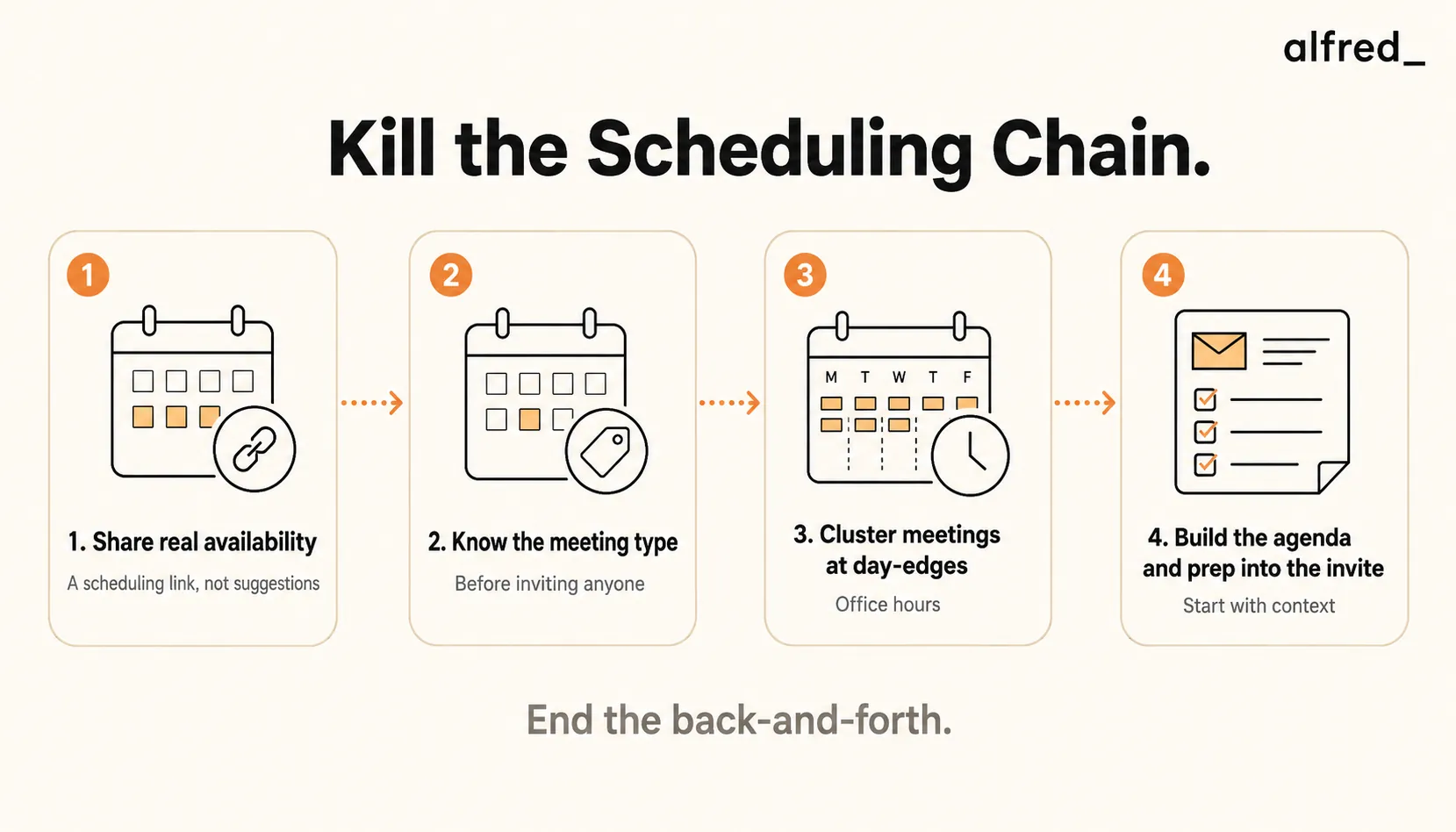
1. Share Real Availability, Not Suggestions
The phrase “Does Tuesday work for you?” is an invitation to negotiate. Replace it with a scheduling link that shows your actual available slots. The recipient picks a time without discussion. No suggestions, no counter-proposals, no “how about the week after?” The negotiation phase is simply removed.
This isn’t impersonal; it’s efficient. “Here’s my calendar” communicates the same thing as “Does Tuesday work?” but returns an answer instead of starting a loop.
2. Know the Meeting Type Before You Invite Anyone
Patrick Lencioni’s framework from Death by Meeting identifies four distinct meeting types, each with different durations, attendee lists, and purposes:
- Daily Check-In: 5-10 minutes, standing, administrative only. Not for strategy.
- Weekly Tactical: 45-90 minutes. Agenda built from a lightning round, not set in advance. Resolves tactical issues across functions.
- Monthly Strategic: 2-4 hours. One topic. Conflict required (Lencioni calls this “mining for conflict”). No pre-set agenda.
- Quarterly Off-Site: 1-2 days. Review and reset. Takes people out of tactical mode entirely.
If you don’t know which type of meeting you’re scheduling before you send the invite, you will send the wrong invite: wrong duration, wrong attendees, wrong purpose. That mismatch is what produces meetings that feel purposeless, run over time, or fail to make the decisions they were called to make.
Knowing the type first determines: who you invite, how long you need, what prep is required, and whether the meeting is necessary at all.
3. Cluster Meetings at Day-Edges: Paul Graham’s Office Hours
Paul Graham’s 2009 essay “Maker’s Schedule, Manager’s Schedule” identified an asymmetry that most professionals feel but can’t name. “When you’re operating on the maker’s schedule,” Graham writes, “meetings are a disaster. A single meeting can blow a whole afternoon, by breaking it into two pieces each too small to do anything hard in.”
The anticipatory cost is just as real: “I often blow a whole morning if I know I have a meeting in the afternoon.” The meeting hasn’t happened yet, but its presence in the calendar changes how you engage with the hours before it.
Graham’s solution is office hours: “I’ve started using the manager’s trick of clustering meetings at the end of the day. These chunks of time are at the end of my working day.” When you schedule all meetings after 2 PM, mornings become protected maker time: long, uninterrupted, cognitively available.
Apply this to your scheduling link: block mornings as unavailable. Show availability only from early afternoon onward. Most people won’t question it.
4. Include Agenda and Prep in Every Invite
Grove is unambiguous on this in High Output Management: arriving at a meeting unprepared is negative leverage. It wastes every attendee’s time, and more than that, it deprives them of alternative uses of that time. A meeting that could have been productive becomes dead time for everyone present.
Every meeting invite should answer three questions: What is the purpose of this meeting? What decision needs to be made? What should attendees read or prepare beforehand? If you can’t answer those three questions before sending the invite, you’re not ready to schedule the meeting.
This has a secondary benefit: it filters out bad meetings before they happen. If you can’t articulate what the meeting is for, that’s a signal that it might not need to happen at all.
Step-by-Step: Schedule Meetings Without Back-and-Forth
1. Define the Meeting Type and Purpose First
Before you open your calendar, answer: Is this a Daily Check-In, Weekly Tactical, Monthly Strategic, or Quarterly Off-Site? What decision or outcome will this meeting produce? Who are the minimum necessary attendees? If you can’t answer these, the meeting may not be ready to schedule.
2. Share Your Scheduling Link, Not a Question
Replace “Does Tuesday work?” with a scheduling link in your email signature and every outbound message where scheduling might come up. Set your scheduling link to show only afternoon availability. The recipient sees real slots, picks one, and the meeting is booked. The chain never starts.
3. Build the Agenda and Prep Into the Invite
When the meeting is booked, send a calendar invite that includes: (1) the purpose of the meeting in one sentence, (2) the decision or outcome expected, and (3) any pre-read materials. Grove’s standard: if attendees arrive prepared, the meeting takes half the time and produces twice the output.
4. Cluster All Meetings in the Afternoon
Apply Graham’s office hours principle to your entire calendar. Block 8 AM to 12 PM as unavailable in your scheduling tool. Move existing recurring meetings to afternoon slots wherever possible. Protect mornings as sacred maker time. The effect compounds: each morning saved is a morning available for the deep work that produces your best output.
5. Let alfred_ Monitor Your Calendar for Conflicts
Connect alfred_ to your calendar. It monitors your schedule continuously, surfaces double-bookings and conflicts before they become problems, and protects your focus blocks from being eroded by incoming scheduling requests. When new meeting requests arrive by email, alfred_ flags conflicts in your morning brief. You never discover a scheduling problem by walking into a room expecting one meeting and finding another.
Before and After: The Scheduling Stack in Practice
Before: The 9-Email Scheduling Chain
- Monday 10 AM: “Does Tuesday or Wednesday work to connect?” (interruption 1)
- Monday 2 PM: “Tuesday works. Morning or afternoon?” (interruption 2)
- Monday 4 PM: “Afternoon. How about 3 PM?” (interruption 3)
- Tuesday 9 AM: “3 PM works! Let me send a calendar invite.” (interruption 4)
- Tuesday 9:30 AM: Counter-proposal arrives: “Actually can we do 2?” (interruption 5)
- Tuesday 10 AM: “Sure, 2 works.” Invite sent. (interruption 6)
Total: 6 interruptions, 28 hours of elapsed time, no prep included in invite.
After: One Link, One Click
- Monday 10 AM: “Here’s my calendar for this week. Agenda and pre-read included in the invite.” (1 email sent)
- Monday 10:15 AM: Recipient picks Tuesday 2 PM from the scheduling link.
- Monday 10:16 AM: Calendar invite auto-sent. Agenda included. Meeting booked.
Total: 1 email, 16 minutes, agenda included, zero negotiation.
1.5-2 hrs
to schedule a larger group meeting through manual back-and-forth, versus minutes with a scheduling link
The Roles Question: Who Should Be in This Meeting?
Jeff Bezos’s two-pizza rule is a useful starting point: if you can’t feed the meeting with two pizzas, it’s too big. Beyond 5-8 people, meetings stop being decision-making forums and start being performances. People manage their visibility rather than contributing their thinking.
Bezos’s operational implementation of this: remove one person at a time until the meeting would break without them. Everyone who remains past that point is optional.
Jim Collins puts it differently in Good to Great: “Good is the enemy of great.” Every optional attendee you invite is taking time from their great work to attend something that’s merely good for them to know about. The meeting that has seventeen attendees because “it might be useful for them to hear this” is exactly the meeting that Collins would classify as a good activity crowding out a great one.
The minimum viable attendee list is not about efficiency. It’s about quality. Smaller meetings make better decisions, faster.
Grove’s preparation test applied to invites: “What would happen if this person were not in this meeting at all?” If the answer is “nothing changes,” remove them from the invite. Send them the summary afterward.
The Process-Oriented Meeting vs. The Mission-Oriented Meeting
Grove distinguishes between two types of meetings in High Output Management: process-oriented meetings (regular, recurring, planned) and mission-oriented meetings (ad hoc, called to resolve a specific problem). His view on the latter is unambiguous: “Ideally, a manager should never have to call an ad hoc, mission-oriented meeting, because if all runs smoothly, everything is taken care of in regularly scheduled, process-oriented meetings.”
Most scheduling back-and-forth is caused by mission-oriented meetings called at the last minute without clear purpose. The urgency creates the chaos. If your recurring process-oriented meetings are well-designed, with the right frequency, right attendees, and right duration, most ad hoc scheduling requests evaporate because the need gets addressed in the standing structure.
This connects directly to Lencioni’s framework: the four meeting types aren’t just a categorization system. They’re a complete meeting calendar. Organizations that run all four types well rarely need emergency sessions.




