

If your calendar feels chaotic, you are not undisciplined. You are looking at the result of a year of individual yes-decisions that were never reviewed as an aggregate. The fix isn’t better willpower. It’s a 90-minute audit that prunes the accumulated debt and rebuilds your week from a blank slate. alfred_ keeps the ideal week intact afterward by surfacing conflicts across Google + Outlook and producing a morning brief of today’s schedule with context.
Most professionals find 60-70% of their week is already committed before they schedule any focused work. That’s the structural problem. You agreed to each meeting individually. You never agreed to the aggregate.
23 hours/week
Average meeting time for executives, over 50% of the workweek before any deep work is scheduled
31 hours/month
Time the average professional spends in unproductive meetings, the equivalent of nearly four full workdays
65%
of senior managers say meetings prevent them from completing their own work
If Your Calendar Feels Chaotic, Here’s What’s True
If any of these describe your week, this audit is for you:
- You look at Monday morning and your calendar is already ≥60% booked
- You have recurring meetings you’ve forgotten the purpose of
- Your “deep work” gets squeezed into evenings or weekends because mornings are gone
- Meetings are scattered across the day in 30-min chunks that prevent focus
- You say yes to new invites because declining feels rude
- You end the week exhausted but can’t point to what you actually built
None of these are discipline problems. They’re structural accumulation problems. Recurring meetings accumulate without natural expiration. Commitments never prune themselves. The audit is a forced pruning event.
Drucker’s Time Audit, Applied Forward
Peter Drucker’s time audit in The Effective Executive has three steps: Record (what are you actually doing?), Prune (what shouldn’t be there?), and Consolidate (how can the remaining time combine into large, usable blocks?). Most people know it but only apply it retrospectively.
A calendar audit applies the same three steps forward. Instead of reviewing your time log, you review your calendar. Your committed future. This is more powerful than retrospective analysis because you can still change it.
Drucker’s two pruning questions, applied to every recurring meeting:
- “What would happen if this were not done at all?” If “nothing significant,” eliminate it.
- “Could someone else attend this just as well?” If yes, delegate your attendance.
Apply ruthlessly. Most recurring meetings were added for a reason that may no longer exist. The project they tracked has launched. The onboarding they supported is complete. The relationship they maintained is solid enough for async.
Collins’s Stop Doing List for Your Calendar
“The presence of an ever-expanding to-do list without a robust stop-doing list is a lack of discipline.”, Jim Collins, Good to Great
Collins’s insight applies with particular force to calendars. Your to-do list eventually gets done and the item disappears. Your recurring meeting never disappears unless you explicitly cancel it. The natural default of a calendar is accumulation.
Collins’s evaluation question: “If we were starting from scratch today, would we choose to do this?” Apply it to every recurring item. If the answer is no, it belongs on your Stop Doing list.
Collins also notes “good is the enemy of great.” Every good recurring meeting that stays on your calendar is taking time that could go to great focused work. The audit isn’t about eliminating things that are bad. It’s about eliminating things that are merely good to make room for what’s genuinely important.
Lencioni’s Four Meeting Types
Patrick Lencioni’s Death by Meeting identifies four distinct meeting types serving fundamentally different purposes:
- Daily Check-In (5–10 min, standing, coordination only)
- Weekly Tactical (45–90 min, seated, operational issues)
- Monthly Strategic (2–4 hrs, focused, one or two strategic topics)
- Quarterly Off-Site (1–2 days, high-level review)
A common audit finding: strategic topics shoehorned into tactical meetings. Someone tries to resolve a major organizational question in the last 10 minutes of a weekly status meeting. The fix often isn’t canceling. It’s restructuring so each meeting serves its intended purpose instead of all purposes badly.
If you have recurring meetings that are perpetually unsatisfying, the problem is often a type mismatch rather than the meeting itself.
Step-by-Step: Run the 90-Minute Audit
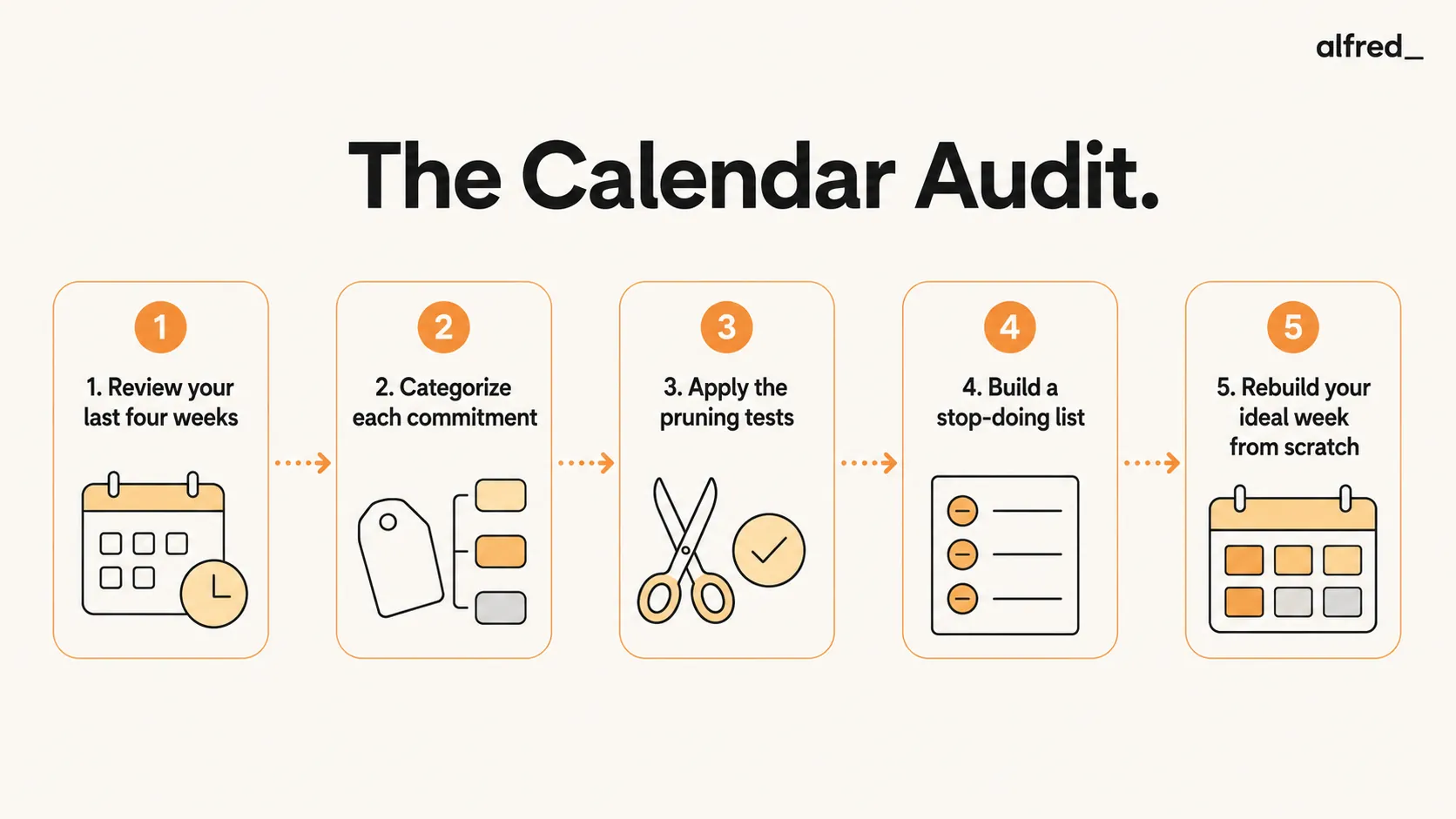
Step 1: Review Your Last 4 Weeks
Scroll through or export the last four weeks. List every recurring commitment. This is your actual schedule. Don’t include one-offs, focus on the recurring structure that defines your typical week.
Step 2: Categorize Each Commitment
Sort every recurring event into one of: deep work, decision meeting, status/update meeting, one-on-one, admin, relationship/networking, personal. Calculate total hours per category per week.
The numbers are usually surprising. Common finding: status/update meetings consume 40%+ of the week with zero decisions produced.
Step 3: Apply the Pruning Tests
For each recurring meeting, ask Drucker’s two questions. Then apply Grove’s leverage test: is this a high-leverage activity that specifically requires me? Low-leverage meetings you can’t fully delegate should still be reviewed for format, can they become async? Shortened? Less frequent?
Step 4: Build Your Stop Doing List
Create an explicit list of meetings to: cancel, shorten, delegate attendance for, or convert to async. Then act this week. Every item you remove returns time permanently. A 30-min weekly meeting canceled today is 26 hours returned over a year.
Step 5: Rebuild Your Ideal Week From Scratch
Don’t patch the existing calendar. Start with a blank week:
- Block deep work first (Newport’s time-blocking principle), mornings before noon.
- Consolidate meetings into an afternoon window.
- Leave 20% buffer unscheduled.
- Add back only the recurring commitments that survived the pruning test.
The ideal week you design becomes your target structure for the next quarter.
The Ideal Week Template (Executive Baseline)
| Time Block | Purpose | Why |
|---|---|---|
| 8:00 – 9:00 AM | Morning brief review + top-of-day triage | High cognitive state; decide the day's 1-3 real priorities |
| 9:00 – 12:00 PM | Deep work block (no meetings) | Newport's 3-hour contiguous block for focused output |
| 12:00 – 1:00 PM | Lunch + buffer | Unstructured, do not schedule meetings here by default |
| 1:00 – 4:30 PM | Meeting window (consolidated) | All recurring and discretionary meetings batched into afternoon |
| 4:30 – 5:30 PM | Email window + wrap-up + tomorrow's brief | Single afternoon email window; clear decisions out before day end |
| Protected buffer | 20% of the week unscheduled | Accommodates ad-hoc urgent items without displacing deep work |
How AI Assistants Fit Into the Audit
The audit itself is a human decision exercise. No AI can tell you which recurring meetings deserve to exist, only you know whether last quarter’s onboarding meeting still earns its slot. Where AI helps is keeping the ideal week intact after the audit.
| Tool | What It Does for Calendar Chaos | Price |
|---|---|---|
| alfred_ | Unified view of Google + Outlook calendars, morning brief with today's meetings and context, surfaces overbooked days and double-bookings, RSVP from dashboard, creates events with natural-language input | $29.99/mo |
| Reclaim.ai | Auto-schedules tasks around meetings, defends routines (lunch, focus time), syncs work and personal | $10–22/mo |
| Motion | Auto-schedules tasks into calendar gaps, replans when meetings shift, AI task prioritization | $19–29/mo |
| Manual (calendar app alone) | Block-and-hope, requires ongoing discipline you just proved you don't have | $0 |
Why alfred_ is the audit-partner pick: the audit produces an ideal week. That week slips the moment a new meeting request arrives and you say yes without thinking. alfred_ produces a morning brief every day showing today’s schedule with meeting context (prep docs, attendees, conflict with deep work), so you catch the erosion early. It also creates events from natural language (“block 2hrs tomorrow for proposal review”) and surfaces schedule conflicts across accounts. The other tools solve adjacent problems (auto-scheduling, routine defense) well. alfred_ is specifically the tool that keeps your audit’s intent visible.
After the Audit
The before-and-after of a calendar audit is one of the most dramatic transformations in professional productivity work. Before: scattered meetings throughout the day, mornings consumed by status updates, no time for work that actually matters. After: mornings protected for deep work, meetings consolidated into afternoon blocks, each recurring commitment earning its place.
Drucker’s consolidation principle for the rebuild: “even one quarter of the working day, if consolidated in large time units, is usually enough to get the important things done.” The goal isn’t to empty your calendar. It’s to create enough large, contiguous blocks that the work that matters actually gets done.
The chaos isn’t a you problem. It’s an accumulation problem with a known fix. Run the 90 minutes. Rebuild the week. Then keep it honest.




