

You went to law school to practice law. You spend a third of your day practicing email.
This is not a minor annoyance. It is a financial catastrophe hiding in plain sight, compounded by a risk that no other profession faces: in law, a missed email is not just an inconvenience. It is a potential malpractice claim.
Research on lawyer productivity consistently shows that attorneys spend 2-3 hours per day on email. For litigators juggling multiple active matters, discovery deadlines, and opposing counsel communications, it often exceeds 3 hours. At a billing rate of $400/hour, that is $800-1,200 per day in lost billing capacity. Over a year, that is roughly $200,000-$300,000 in revenue that never materializes, not because you weren’t working, but because the work you were doing doesn’t appear on any invoice.
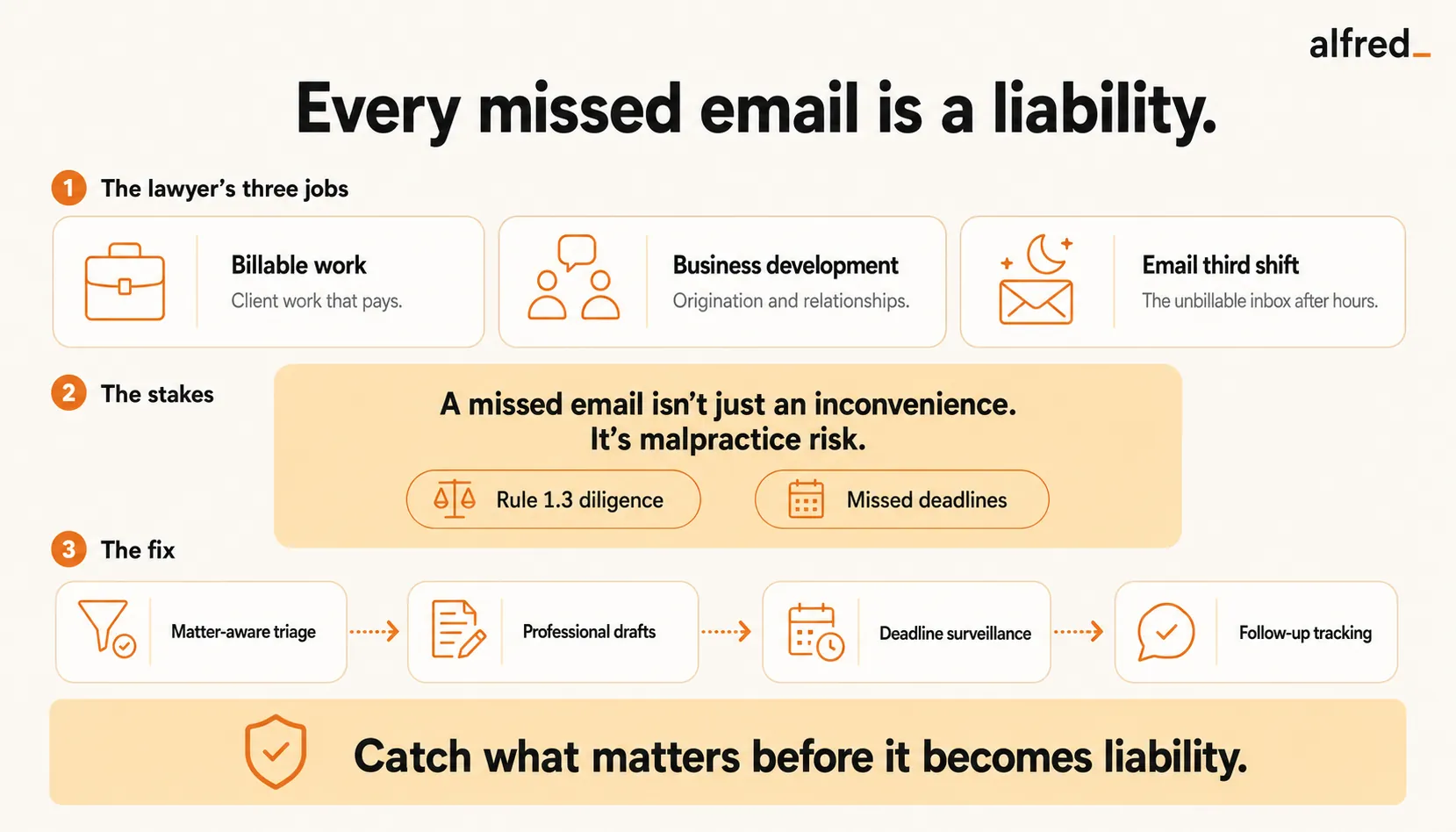
The Unbillable Third Shift
Every lawyer has three jobs:
The billable work. Research, drafting, depositions, court appearances, client counseling, negotiations. This is what you trained for. This is what generates revenue.
Business development. Networking, client lunches, speaking engagements, CLE presentations. Not directly billable, but clearly tied to future revenue. Most firms understand this investment.
Email. The third shift. Client questions that don’t rise to the level of a billed communication. Scheduling depositions. Coordinating with co-counsel. Internal firm communications. Administrative back-and-forth with courts, clerks, and opposing counsel’s assistants. CLE registration. Bar association correspondence. The vendor who wants to sell you legal tech. The recruiter who found your LinkedIn profile.
None of this is billable. All of it is mandatory. And it occupies the best hours of your day, the morning hours when your cognitive capacity is highest, burned through before you open the brief you need to write.
“I bill $400/hr and I spend 2-3 hours a day on email I could have a $15/hr assistant handle. But I can’t have a $15/hr assistant handle it, because half of it is privileged client communication.”
That’s the trap. The email isn’t administrative, or rather, it is administrative, but it’s legal administrative. Client communications carry privilege obligations. Opposing counsel emails carry strategic implications. Court notices carry jurisdictional deadlines. You can’t hand this to a temp. The judgment required is specifically legal judgment.
The Malpractice Shadow
Every profession has consequences for missed emails. In law, the consequence has a name: Rule 1.3, Diligence.
The ABA’s Model Rule 1.3 requires lawyers to act with “reasonable diligence and promptness” in representing clients. A buried email containing a discovery deadline. An overlooked notice of a court filing. A client communication requesting action that slipped into a thread between 60 other messages.
According to the ABA’s 2023 Profile of Legal Malpractice Claims, failure to calendar or react to deadlines accounts for a significant portion of malpractice claims. Administrative errors, including failures of communication, are consistently among the top drivers. These aren’t cases of incompetence. They’re cases of overwhelm. The deadline wasn’t missed because the lawyer didn’t care. It was missed because it was email number 147 on a Tuesday when two depositions were scheduled.
This creates a unique form of inbox dread. Every professional feels anxiety about unread email. Lawyers feel anxiety about liability in unread email. The background hum is not “I might be behind.” It is “something in that inbox might cost me my license.”
“I don’t check email because I want to. I check it because I’m terrified of what happens if I don’t.”
Why Practice Management Software Doesn’t Fix This
You already have Clio. Or MyCase. Or PracticePanther. These are excellent tools for billing, document management, and case tracking.
None of them read your inbox.
Clio ($49-149/user/month) tracks time, manages documents, and organizes matters. It does not triage your email, draft your replies, or flag that opposing counsel sent a response deadline 3 days ago that you haven’t addressed. MyCase ($50-130/user/month) has a client portal and billing automation. It does not process the 120 emails sitting in your inbox right now.
The gap is the communication layer. Practice management software organizes the case. Nobody organizes the communication about the case, the daily torrent of emails that carry deadlines, client concerns, scheduling requests, and strategic information buried in threads you don’t have time to read carefully.
Other things lawyers try:
- Superhuman ($30-40/month) makes you faster at email processing. But speed without triage is just faster drowning. You still read every email, still decide what matters, still draft every reply.
- SaneBox ($7-36/month) filters newsletters and low-priority messages. But when you’re a litigator, “low priority” is not a category that exists. A message from opposing counsel’s paralegal about rescheduling might contain a strategic deadline shift.
- Microsoft Copilot summarizes email threads. Summaries don’t draft the response. Summaries don’t track the deadline. Summaries don’t notice that your client hasn’t signed the engagement letter you sent 10 days ago.
What You Actually Need
You need something that reads every email in your inbox and applies judgment. Not keyword filtering. Not folder rules. Judgment.
You need it to understand that the email from Judge Chen’s clerk about a hearing date change is urgent and matter-specific. That the email from your client’s CFO about the settlement amount needs your personal attention. That the CLE vendor email can wait indefinitely. That opposing counsel’s email about extending discovery deadlines contains an implicit strategic signal worth flagging.
You need it to draft the routine replies, the scheduling confirmations, the acknowledgments, the “received, will review” messages, so you can spend your time on the communications that require legal reasoning.
And you need it to track every deadline, every follow-up, every outstanding item across every active matter, because your brain can hold about 7 things and you have 35 open matters.
How alfred_ Works for Lawyers
alfred_ connects to your email and calendar, Gmail or Outlook, and starts learning your practice immediately.
Matter-aware triage. Your morning brief organizes everything by case and urgency. “Smith v. Jones: opposing counsel responded to your motion to compel, deadline to reply is Friday, draft response structure attached. Anderson matter: client’s CFO sent the financial documents you requested. Garcia estate: beneficiary has questions about distribution timeline, draft reply ready for review. Internal: managing partner wants your input on the associate hiring committee.” You see what matters, organized by how your practice actually works.
Professional drafts. alfred_ learns your writing style. Your formality level, your case reference patterns, how you address clients versus opposing counsel versus judges’ chambers. The draft to your corporate client’s GC reads differently from the draft to a family law client. You review everything before it sends. But the 20 minutes you’d spend drafting the scheduling confirmation with co-counsel? Already done.
Deadline surveillance. Every date mentioned in every email across every matter is tracked. Discovery deadlines. Filing deadlines. Response windows. Statute of limitations. Client-imposed deadlines. alfred_ doesn’t just track them. It alerts you with lead time. “Response to motion to compel due Friday, 3 business days. Client engagement letter unsigned after 10 days, follow-up draft ready.” The malpractice risk of a buried deadline drops to near zero.
Follow-up tracking. The interrogatories you sent 18 days ago. The settlement demand waiting for a response. The expert witness who hasn’t confirmed availability. alfred_ tracks every outstanding item and surfaces them before they become problems. You stop carrying 35 matters’ worth of open loops in your head.
The Math
A mid-career attorney billing $400/hour who spends 2.5 hours per day on unbillable email:
- Lost billing capacity per day: $1,000
- Lost billing capacity per month: $20,000 (20 billing days)
- Lost billing capacity per year: $240,000
If alfred_ handles 60% of that email work, the triage, the routine drafts, the scheduling, the follow-up tracking. You reclaim roughly 1.5 hours per day of potential billing time.
- Reclaimed billing capacity per month: $12,000
- Cost of alfred_ per month: less than one billable hour
- ROI: hundreds to one
Even if you don’t bill every reclaimed hour, and you won’t, the reduction in malpractice risk alone justifies the cost. One missed deadline can generate a claim that costs hundreds of thousands of dollars in defense costs and settlements. alfred_ is insurance that actually prevents the event instead of just covering it.
The Relief
Beyond the math, there’s something else. Something lawyers don’t admit in professional settings.
The anxiety. The dread of opening the inbox. The 11 PM check “just to make sure.” The nagging feeling on Saturday morning that something is in there, waiting, ticking.
When you know that alfred_ has already read everything, surfaced the deadlines, flagged the urgent items, and drafted responses to the routine ones, the hum goes quiet. You can focus on the brief. You can be present in the deposition. You can leave the office and not feel the pull.
You did not go to law school to triage email. You went to practice law.
Try alfred_.
Your inbox is not your practice. Stop letting it practice you.




