


Clockwise Is Gone: What Former Users Need to Know
If you landed here after opening Clockwise and finding a farewell page, here is the situation in four facts, all from Clockwise’s own shutdown notice:
- The product shut down on March 27, 2026, following the Salesforce acquisition; the Clockwise team joined Salesforce and the product was not continued.
- Your data is gone, not transferred. Clockwise stated plainly that nothing moves to Salesforce: calendar preferences, scheduling links, and Focus Time settings were deleted shortly after the shutdown date. There is nothing left to export, which means whichever tool you pick, you are rebuilding your settings from scratch (budget 20-30 minutes, it’s less painful than it sounds).
- Refunds were prorated automatically for any prepaid subscription extending past March 27, 2026. (For the record, Clockwise sold three tiers before the shutdown: Free, Teams at $6.75/user/month, and Business at $11.50/user/month; those plans no longer exist to buy.)
- Clockwise itself pointed users at Reclaim.ai, which committed to a 100% price match and priority migration support for Clockwise customers, an offer still worth invoking if you go that route.
The rebuild checklist for any replacement: recreate your focus-time rules and no-meeting blocks first (they decay fastest), then habits and recurring holds, then scheduling links, and finally re-invite the teammates who shared your old links, since every old Clockwise link now dead-ends.
Why People Looked for Clockwise Alternatives (Even Before the Shutdown)
The shutdown made switching mandatory, but it’s worth knowing the limitations that were driving users away even before March 2026, because they tell you what to demand from a replacement:
- External meeting limitation: Clockwise could only reschedule internal team meetings. If your calendar includes clients, vendors, or cross-organization collaboration, Clockwise couldn’t help optimize those.
- Outlook support deprecated: Clockwise pulled its Microsoft Outlook support back into beta and stopped development, leaving Outlook-dependent organizations without a path forward.
- Limited integrations: Clockwise dropped Asana integration and has minimal connections to task management systems, making it harder to align meetings with actual work.
- Once-daily optimization: The system optimizes your calendar once per day rather than continuously adapting to changes in real-time.
- Static focus time: Focus time blocks don’t dynamically adjust when meetings shift, leading to fragmented schedules.
- Chrome extension dependency: Full functionality requires a Chrome browser extension, limiting flexibility for users on other browsers or platforms.
- Team-first design: Individual contributors often need personal productivity features beyond calendar optimization, like email management and task scheduling.
alfred_
alfred_ is a persistent personal assistant for your work that goes far beyond calendar optimization. Where Clockwise focused solely on rearranging team meetings, alfred_ serves as your comprehensive productivity partner, managing email triage, calendar scheduling, task organization, and meeting preparation all in one unified interface. Unlike Clockwise's team-centric approach, alfred_ is purpose-built for individual professionals who need an AI assistant that handles the full scope of daily work. It doesn't just optimize when meetings happen. It drafts email responses, schedules both internal and external meetings, integrates tasks from multiple sources, and provides intelligent context before every call.
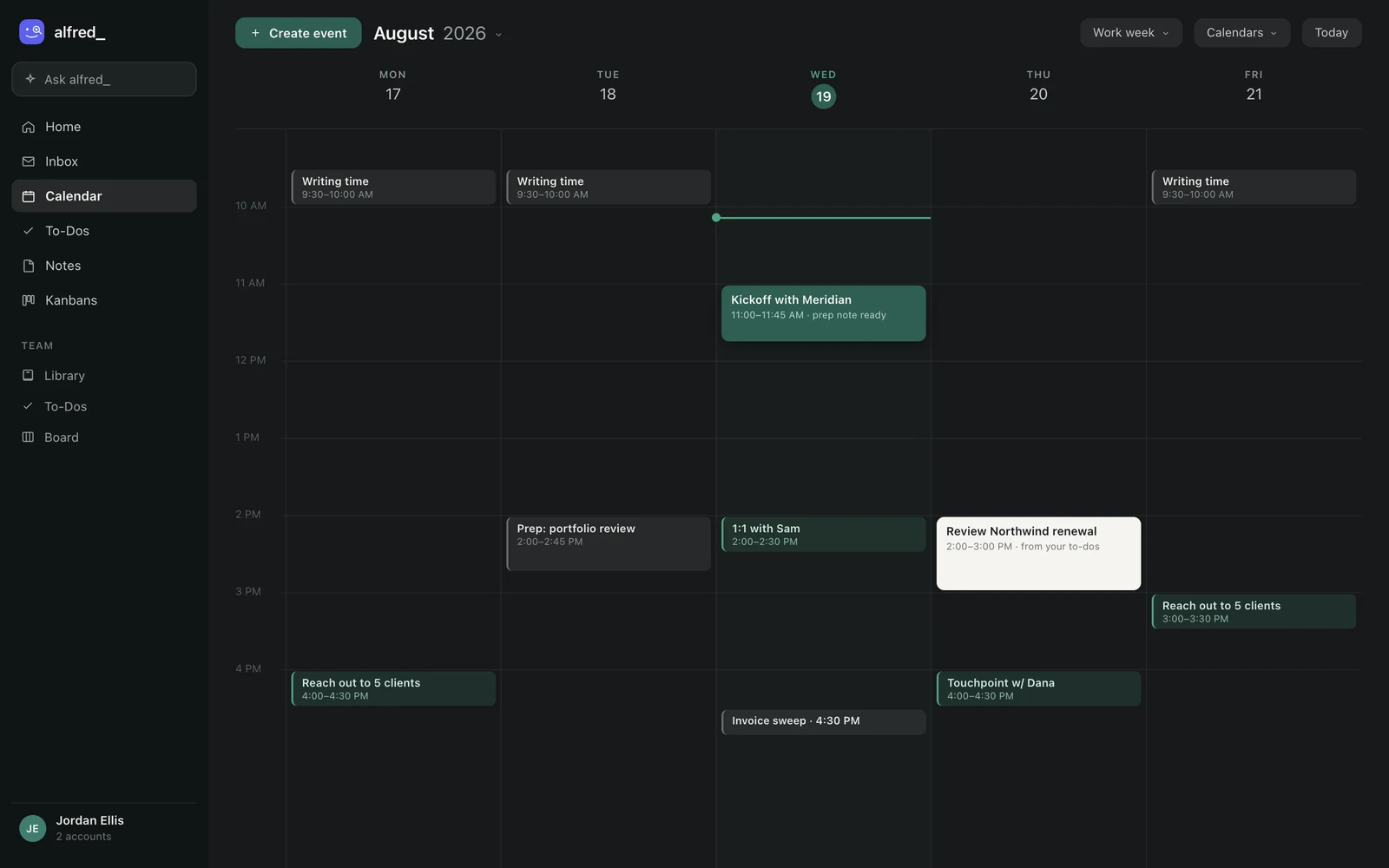
Where Clockwise stopped at meeting placement, alfred_ schedules the work too: meetings, focus blocks, and to-dos on one calendar. Shown with sample data.
Reclaim.ai
Reclaim.ai is an AI calendar assistant that provides real-time schedule optimization, a significant upgrade over Clockwise's once-daily approach. It automatically defends your focus time, schedules habits and breaks, and integrates directly with task management tools that Clockwise no longer supports. The platform excels at maintaining full Outlook support (which Clockwise had deprecated) while continuously updating your calendar throughout the day as meetings shift. Reclaim's adaptive focus time automatically moves and resizes based on your actual availability, preventing the fragmented schedules that plague Clockwise's static blocks.
Motion
Motion combines AI calendar optimization with full project management capabilities, making it ideal for users who need more than Clockwise's calendar-only focus. The platform automatically schedules your tasks based on deadlines, priorities, and available calendar time, then reschedules everything in real-time as meetings change. Where Clockwise only optimized when meetings happened, Motion takes the next step by filling your calendar with the right tasks at the right time. It's particularly valuable for project managers, agency teams, and anyone juggling multiple deadlines who needs both meeting coordination and work execution in one system.
Morgen
Morgen is a calendar consolidation powerhouse that brings together Google Calendar, Outlook, iCloud, and even CalDAV calendars into a single unified interface. Where Clockwise had dropped Outlook support, Morgen embraces multi-platform compatibility with AI-powered scheduling suggestions across all your calendar providers. The platform excels at being your calendar hub regardless of what services you use, particularly valuable for professionals who maintain separate work and personal calendars across different platforms.
Calendly
Calendly is the industry-standard scheduling platform with over 20 million users, and it directly addresses what was Clockwise's biggest limitation: external meeting scheduling. Where Clockwise couldn't reschedule meetings with people outside your organization, Calendly is purpose-built for exactly that use case. The platform has become synonymous with 'send me your Calendly link,' offering sophisticated scheduling automation for sales calls, customer meetings, interviews, and any external coordination.
SavvyCal
SavvyCal takes a relationship-first approach to scheduling that feels more personal than traditional booking links. Instead of forcing invitees to visit a separate scheduling page, SavvyCal overlays your availability directly in the conversation, making scheduling feel collaborative rather than transactional. The platform's signature feature is ranked availability, where invitees can see which time slots you prefer and choose accordingly. This creates a more balanced scheduling dynamic, particularly valuable for consultants, coaches, and professionals who want to maintain relationship quality during the scheduling process.
Cal.com
Cal.com is the open-source alternative to Calendly and addresses what was Clockwise's external meeting limitation with complete scheduling infrastructure you can self-host. For organizations concerned about data privacy or needing deep customization, Cal.com offers the full source code and API-first architecture that proprietary tools can't match. The platform provides a completely free tier with unlimited event types and bookings, something Clockwise never offered.
Clockwise Alternatives: Quick Comparison
How to Choose the Right Clockwise Alternative
Selecting the right replacement depends on which part of Clockwise you were actually using, and which of its gaps you no longer have to live with:
Choose alfred_ if:
- You need more than calendar optimization: email management, task integration, and meeting prep
- You schedule both internal and external meetings regularly
- You’re an individual contributor or executive rather than managing team calendars
- You want a unified AI assistant for your entire workflow
Choose Reclaim.ai if:
- You want real-time calendar updates instead of once-daily optimization
- You need task management integration with tools like Asana or Linear
- You require the full Outlook support Clockwise had dropped
- You want dynamic focus time that adapts to schedule changes
Choose Motion if:
- You need integrated project management with calendar optimization
- You want AI to schedule both meetings and work tasks automatically
- You’re managing projects with dependencies and deadlines
- You prefer native mobile apps over browser extensions
Choose Calendly, SavvyCal, or Cal.com if:
- External meeting scheduling is your primary need (Clockwise’s biggest gap)
- You’re in sales, consulting, or client-facing roles
- You need payment collection or CRM integration (Calendly)
- You want relationship-focused collaborative scheduling (SavvyCal)
- You need open-source infrastructure with self-hosting (Cal.com)
Our Verdict