

The email you dash off in twenty seconds can cost the recipient five minutes and a reply just to figure out what you actually want. Most professional email is too long, too vague, or too ambiguous to act on, which is why so much of it generates a clarifying question instead of a result. A good professional email is engineered, not typed: clear ask, enough context, an obvious next step. Here is how to write email that gets understood and answered the first time, drawing on Bezos’s clarity standard and Newport’s process-centric approach.
What a Professional Email Actually Does
A professional email does one thing: it communicates precisely what you want the reader to know and what you want them to do. Everything else is noise that reduces the probability of the response you need.
Jeff Bezos identified the root cause of poor business communication: “You can hide a lot of sloppy thinking behind bullet points.” The same applies to email. An email that’s long, vague, and full of hedged language isn’t a writing problem. It’s a symptom of unclear thinking about what you actually need. The act of writing forces clarity; most people stop before the clarity arrives and send what they have.
Cal Newport’s process-centric framing is useful here: “What is the actual process this email is part of, and what response would complete that process?” Every professional email exists within a larger project or relationship: a deal being negotiated, a deliverable being coordinated, a decision being made. The question before writing any email is: what response would most directly advance this process toward resolution?
David Allen’s clarify step from Getting Things Done applies equally to email: “Is this actionable? If yes, define the very next physical action required.” Before you write an email, define the next action for the reader. If you can’t do that in one sentence, you haven’t thought it through. The email will reflect the ambiguity.
The Anatomy of an Effective Professional Email
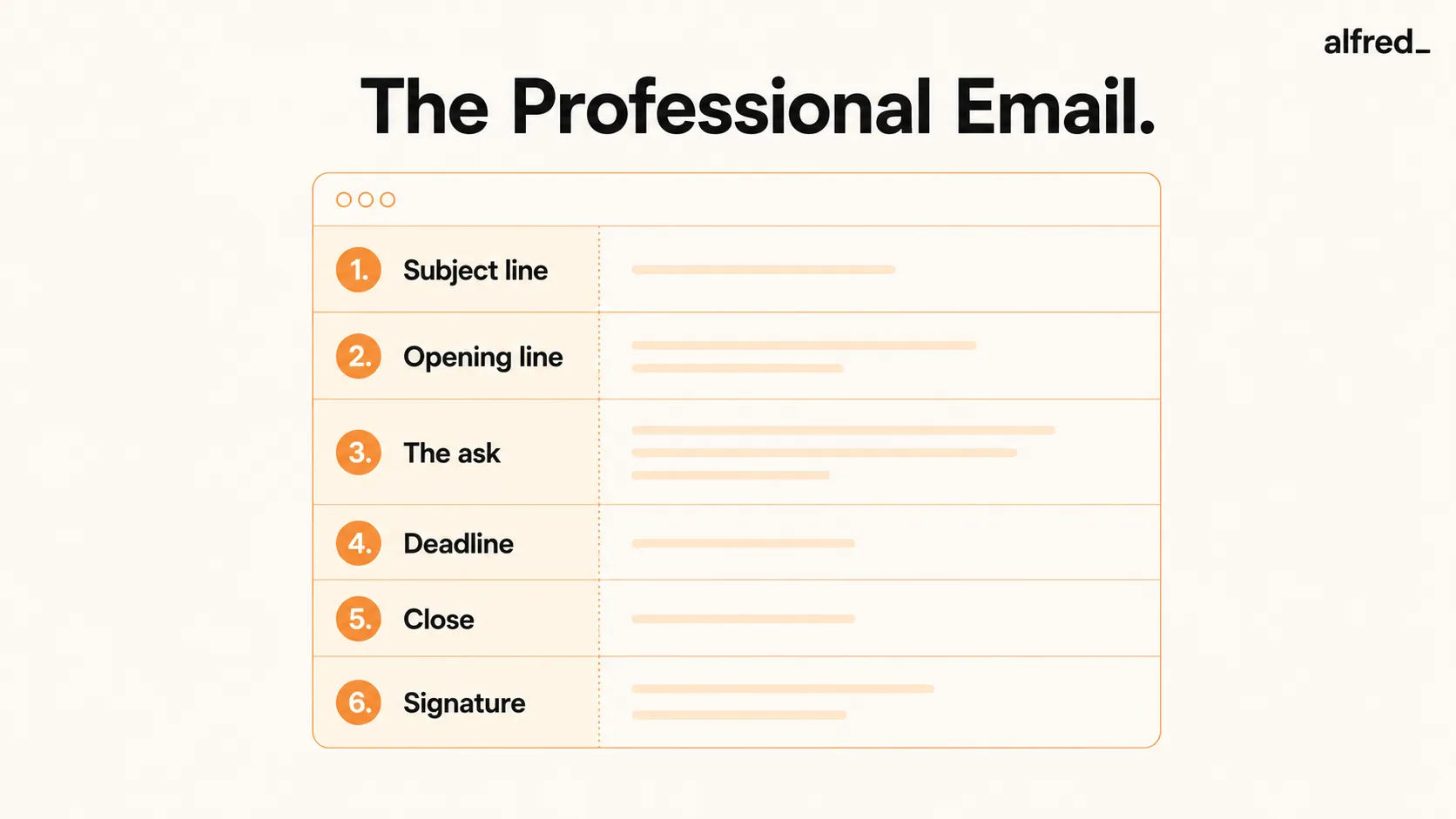
There are six elements of a professional email. Each has a specific job. When one is missing or poorly executed, the email’s effectiveness drops proportionally.
1. Subject Line
The subject line has one job: tell the recipient exactly what this email is and what’s needed from them. “FYI,” “Quick question,” and “Following up” are not subject lines. They’re content-free placeholders that force the recipient to open the email to know what it’s about.
A good subject line is specific: “Decision needed by Friday: Q2 budget allocation” or “Feedback request on attached proposal (15-min read).” The recipient should be able to triage from the subject line alone.
2. Opening Line
Reference the context immediately. Don’t make the reader remember how this email relates to their world. “Re: our call last Tuesday about the Henderson account” is better than “I wanted to follow up on our conversation.” Specific context signals respect for the reader’s time and memory.
3. The Ask
One thing. Not three. If you have three asks, send three emails, or combine them into a numbered list that makes it impossible for the reader to address only one. “I have a few things” is a warning sign that you’ve combined multiple requests into a single email without distinguishing them. The reader will respond to the easiest one and miss the others.
4. Deadline
If you need something by a specific date, say it explicitly. “ASAP” is not a deadline. It means different things to different people and creates anxiety without creating clarity. “Please confirm by Friday EOD” is a deadline. “I need your approval before the contract goes out on Monday at 9 AM” is a deadline. Specific dates and times produce specific responses.
5. Close
End with the most specific possible version of what you need next. “Please let me know your thoughts” requires the reader to interpret what “thoughts” means and on what timeline. “Please reply with your decision by Thursday noon” requires nothing but a reply. The cleaner the close, the faster the response.
6. Signature
Name, title, phone number. Nothing more. A twelve-line email signature with social media icons, company slogans, and legal disclaimers does not make you look professional. It makes the email look like marketing material and increases the visual noise that makes the actual content harder to find.
Bezos on Written Communication
Jeff Bezos banned PowerPoint from Amazon executive meetings and replaced it with a requirement for six-page narrative memos, read silently at the start of every meeting. His reasoning: “There is no way to write a six-page narratively structured memo and not have clear thinking.” And: “You can hide a lot of sloppy thinking behind bullet points.”
“There is no way to write a six-page narratively structured memo and not have clear thinking.”, Jeff Bezos
The principle scales to email. The act of writing forces you to organize your thoughts, identify gaps in your reasoning, and clarify what you actually need. An email written in under thirty seconds, with bullet points substituted for connected thinking, rarely produces clear communication. It required no clear thinking to produce.
The standard to apply: if you can’t articulate exactly what you need from this email in two sentences, you haven’t thought it through. Write those two sentences first. Let them be the email.
Newport’s Process-Centric Email Strategy
Most people write the easiest reply, not the most useful one. Newport’s insight in A World Without Email is that most email inefficiency is caused by optimizing for the wrong metric: minimizing the effort of the individual email rather than minimizing the total number of emails required to resolve the underlying issue.
Newport’s alternative: “Write the response that most quickly brings the project to a final resolution.” This sometimes means putting more effort into a single reply: anticipating follow-up questions, providing the context that would otherwise require another exchange, making the decision rather than asking for permission to make it. The up-front investment of a thorough reply eliminates multiple rounds of follow-up.
For each email, ask: what response would close this loop? Then write that response, not the easiest version of it, but the one that resolves the underlying need. If it takes five extra minutes but eliminates four future emails, the math is obvious.
Professional Email Templates
Template 1: Request Email
Subject: [Specific thing requested]: needed by [date] Hi [Name], [One-sentence context: why you're writing, what this relates to.] I need [specific thing] by [specific date and time] so that [reason why the deadline matters]. [Any essential context in 2-3 sentences maximum.] Please [specific action] and reply to confirm. [Your name] [Title] | [Phone] ### Template 2: Follow-Up Email Subject: Following up: [original subject or specific topic] Hi [Name], Following up on my email from [date] about [specific topic]. I haven't heard back yet. I want to make sure it didn't get lost. [Restate the ask in one sentence.] Could you let me know where this stands by [specific date]? [Your name] ### Template 3: Meeting Request Email Subject: Meeting request: [specific topic], [duration] Hi [Name], I'd like to find 30 minutes to discuss [specific topic]. The goal of the meeting is to [specific outcome or decision]. Here's my calendar: [scheduling link]. If none of those times work, let me know and I'll find alternatives. I'll send an agenda when we're confirmed. [Your name] ### Template 4: Professional Introduction Subject: Introduction: [Your name], [Your role/company] Hi [Name], I'm [Name], [specific role] at [company]. [One-sentence description of what you do that's relevant to them.] I'm reaching out because [specific, honest reason, not generic]. [One sentence of relevant context or mutual connection if applicable.] I'd welcome a brief conversation. [Specific ask: a 20-minute call, a reply to a question, etc.] [Your name] [Title] | [Phone] ### Template 5: Declining a Request Subject: Re: [original subject] Hi [Name], Thanks for thinking of me for [request]. I'm not going to be able to [specific thing]: [brief honest reason, one sentence]. [If appropriate: alternative or referral.] I hope the [project/initiative] goes well. [Your name] ## Step-by-Step: Write an Email That Gets a Response 1 ### Clarify the Purpose Before You Start Writing Answer two questions before opening a compose window: What is the single next action I need from this person? What response would close this loop? If you can’t answer both in one sentence each, stop. You’re not ready to write. Think it through first. The email will take a fraction of the time once you’re clear.
2. Write the Subject Line Last
Write the email body first, then the subject line. The subject line should summarize the entire email, purpose and action, in one line. Writing it last ensures it reflects what the email actually contains, not what you intended before you started writing. Test your subject line: can a reader triage correctly from it alone?
3. State the Ask in the First Two Sentences
Don’t bury the lead. State what you need in the opening, then provide supporting context. The instinct to provide context first, to “set the stage” before asking, reduces response rates because many readers don’t get to the ask before deciding whether to reply now or later. Lead with the ask; follow with the why.
4. Keep to One Topic Per Email
Multiple topics create multiple reply obligations and one of three outcomes: the recipient addresses the easiest topic and ignores the others, they defer the entire email until they have time to address all topics (which may never happen), or they reply to each topic in a single email that creates coordination complexity. One topic per email is a discipline, not a convenience. It reduces total email volume by making replies easier.
5. Let alfred_ Draft the First Version
alfred_ drafts professional emails based on context: incoming emails, calendar items, task lists, and your communication patterns. Describe what you need, review the draft for accuracy and tone, edit for nuance, and send. The drafting time drops from five minutes to thirty seconds. For high-stakes or sensitive emails, the draft still gives you a structural starting point that’s faster to refine than to write from scratch.
36%
higher response rate for emails written at a simple, third-grade reading level than for emails written at a college reading level
Common Professional Email Mistakes
- No subject line or a vague one. “Quick question” tells the reader nothing. They open the email without context, which slows their triage.
- Burying the ask in paragraph three. Many readers don’t reach paragraph three before deciding to reply later. Lead with what you need.
- Multiple asks in one email. The reader addresses the easiest one. The others disappear.
- “Per my previous email.” Passive-aggressive and counterproductive. If your first email wasn’t answered, assume it was missed, not ignored. Follow up neutrally.
- Unnecessary Reply-All. Every person on a Reply-All receives an interruption. Only include people who need to be included.
- Emailing when a 2-minute call would resolve it. Allen’s 2-minute rule applies in reverse: if a phone call takes 2 minutes, make the call. If an email thread will take 10 emails to reach resolution, call instead.




