

The Email Time Problem
Email is where most professional time goes. Not in meetings. Not in deep work. In email. Reading it, processing it, deciding how to respond, writing responses, and then discovering 20 more emails arrived while you were doing all that.
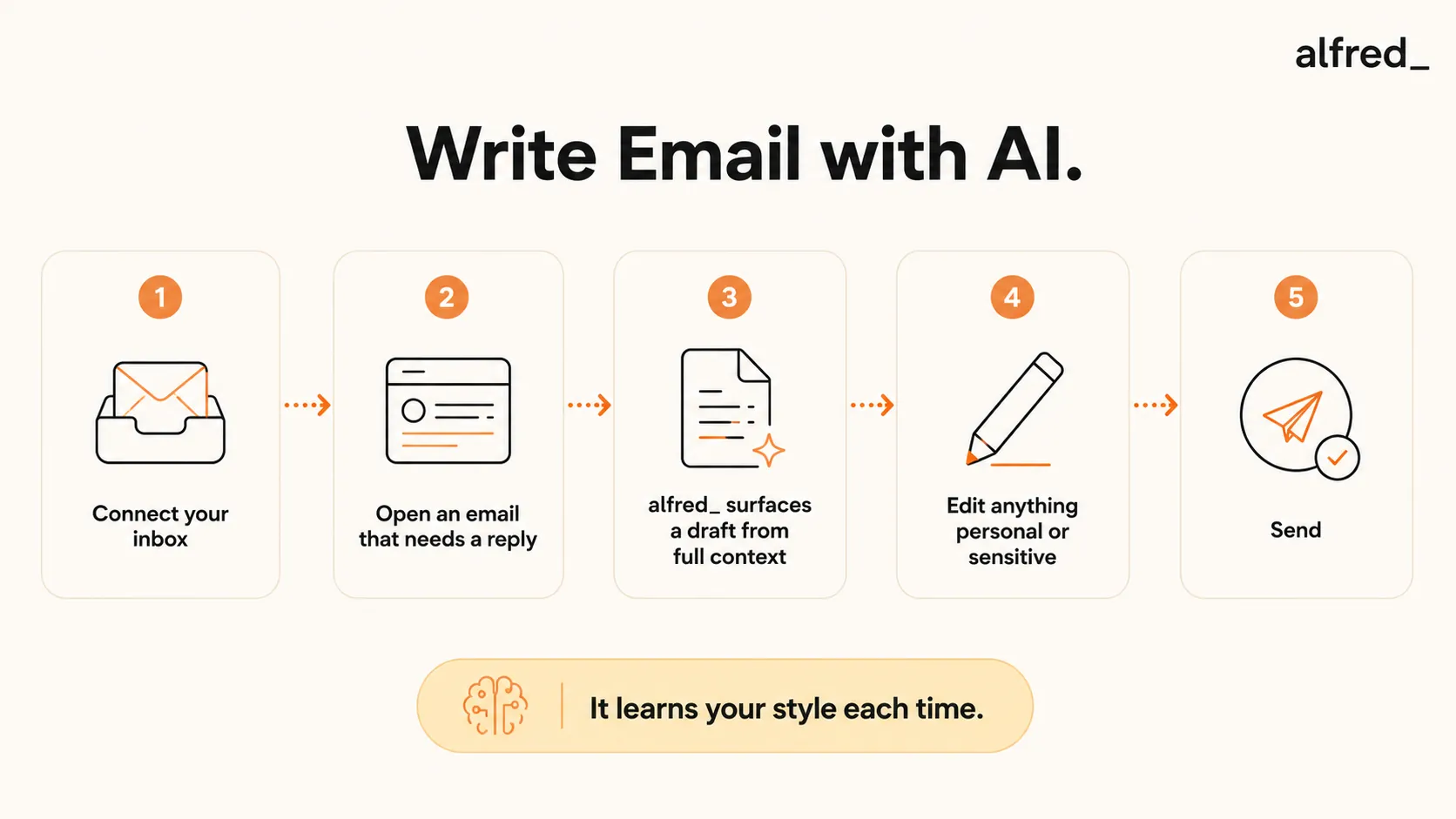
For most professionals, email isn’t a tool. It’s the job. And the volume is only growing. The average knowledge worker receives over 100 emails per day and responds to a significant portion of them. That’s hours per day spent composing messages, most of which are routine, repetitive, and entirely predictable.
2.6
hours per day spent on email by the average professional
The obvious solution is to have AI write more of those emails for you. The less obvious part is understanding what that actually looks like in practice: not the ChatGPT-prompt version, but the integrated, inbox-native version that most people haven’t tried yet.
What AI Email Writing Actually Looks Like
When most people imagine “using AI to write emails,” they picture opening ChatGPT in a separate tab, typing a detailed prompt explaining the situation, copying the output, pasting it into Gmail, and then editing it because it doesn’t quite fit. That workflow is better than nothing, but it’s slow, clunky, and requires you to re-explain context that already exists in your inbox.
Properly integrated AI email writing is completely different. The AI lives inside your email. It reads your inbox. It knows who you’re emailing, what you’ve said to them before, what they’re asking in this message, and how you typically respond to this type of request. When you open an email, a draft reply is already waiting for you.
The Difference Between AI Prompting and AI Integration
AI Prompting (ChatGPT approach)
- You switch to a separate tool
- You explain the context manually
- You copy and paste the output
- Output often misses nuances from the thread
- You must do this for every single email
AI Integration (alfred_ approach)
- Draft is waiting when you open the email
- Context read from your actual thread
- No copy-paste: review and send directly
- Matches your tone from email history
- Works automatically for every email
The integrated approach is dramatically more useful because it removes the friction. You don’t need to think about whether to use AI. It’s just there, already done the work, waiting for your review.
Step-by-Step: Use AI to Write Emails
1. Connect Your Inbox to an AI Email Assistant
Sign up for alfred_ and connect your Gmail or Outlook account via OAuth. This takes about 60 seconds:
- Go to get-alfred.ai/signup
- Click “Connect Email”
- Authorize read and draft access (your password is never shared)
- alfred_ immediately begins analyzing your inbox patterns
The connection is read and draft access only. alfred_ never sends emails without your explicit review and approval.
2. Open an Email That Needs a Reply
Open alfred_ and tap any email that needs a response. Before you read the email itself, alfred_ has already:
- Read the full thread, not just the latest message
- Identified what the sender is asking or needs
- Reviewed your communication history with this sender
- Determined the appropriate tone (formal, casual, brief, detailed)
- Drafted a complete reply
3. alfred_ Surfaces a Draft Reply Based on Full Context
The draft appears in alfred_ alongside the original email. It uses:
- Sender history: How you’ve communicated with this person before, their typical requests, your relationship
- Full thread context: Everything said in the conversation, not just the latest message
- Your writing style: Sentence length, formality level, how you typically open and close emails
- The specific ask: What the sender actually needs from you, extracted from the email content
You didn’t write a single prompt. The draft is already there.
4. Edit for Anything Personal, Sensitive, or Nuanced
Read the draft. For routine emails (scheduling, acknowledgments, status updates, standard replies) it’s often ready to send. For anything that involves:
- Relationship dynamics AI can’t see
- Sensitive negotiations or conflicts
- Personal context only you know
- Creative judgment calls
Add your specific context. The draft gives you a starting point. You complete the 20% that requires your actual judgment.
5. Send: alfred_ Learns Your Style from Each Interaction
Tap Send. alfred_ notes:
- Which drafts you sent as-is (it got those right)
- Which drafts you edited substantially (it missed something)
- What specific edits you made (it learns the pattern)
Over time, alfred_ writes closer and closer to how you actually communicate. After a few weeks, drafts for routine emails often require zero editing.
What AI Writes Well
Not all emails are equal. AI drafts some types of emails nearly perfectly from the first pass. Here are the categories where AI saves the most time:
AI Handles These Excellently
- Routine replies and acknowledgments
- Meeting follow-ups and summaries
- Scheduling and calendar coordination
- Status updates on ongoing projects
- Delegation requests
- Thank-you notes and confirmations
- Standard client updates
- First follow-up after no response
These Still Need Your Input
- Sensitive relationship conversations
- Complex negotiations
- Creative pitches and proposals
- Anything involving internal politics
- Difficult feedback or bad news
- Strategic decisions
- Personal situations
- Anything where the nuance is the whole point
The practical insight: AI handles probably 60-70% of the emails in a typical professional inbox with minimal or zero editing needed. The remaining 30-40% still benefits from having a strong draft to react to, even if you end up rewriting it significantly.
Before vs. After: What Using AI for Email Actually Feels Like
Before: Writing Emails Manually
- 8:30 AM: Open inbox. 15 emails need replies.
- 8:35 AM: Start on the first one. Read the thread. Start writing. Rephrase twice. Send.
- 8:47 AM: Second email. Also requires re-reading context before you can respond.
- 9:30 AM: Seven emails done. Eight more to go. Now you’re late for your first meeting.
- Result: An hour on email before you’ve done a minute of real work.
Time spent: 60 minutes (drafting from scratch)
After: AI Drafts, You Review
- 8:30 AM: Open alfred_. 15 draft replies already queued.
- 8:31 AM: First email: draft is perfect. Tap Send.
- 8:32 AM: Second email: needs one edit. 20 seconds. Send.
- 8:45 AM: All 15 emails done. 8 sent as-is, 7 with minor edits.
- Result: 15 minutes and your inbox is at zero.
Time spent: 15 minutes (review and send)
40%
faster completion of professional writing tasks (including emails) when assisted by generative AI
Does AI Email Sound Robotic?
This is the most common concern, and it’s a legitimate one. Nobody wants to send emails that sound like they were generated by a machine. The good news is that properly integrated AI email writing doesn’t produce robotic output. Here are three reasons why:
- It reads your existing emails, not generic templates. alfred_ learns your specific writing style: your sentence length, your typical greeting, how formal or casual you are with different people, whether you use bullet points or paragraphs. The output matches your voice, not a generic AI voice.
- It improves with every send. Every time you edit a draft before sending, alfred_ learns from that edit. The longer you use it, the closer the drafts get to your natural voice. Most users report that after 2-3 weeks, drafts for routine emails require no editing at all.
- You always review before sending. There’s no scenario where alfred_ sends an email you haven’t read. The review step exists precisely so you can catch anything that doesn’t sound like you before it goes out.
The honest answer: in the first few days, some drafts will need light editing. After a few weeks, most won’t. And the emails that come out of this system are generally more concise and better-structured than what most people write under time pressure.
Privacy: Does AI Read All My Emails?
This is the second most common concern, and it deserves a clear answer. Here’s exactly how alfred_ works:
- OAuth connection only: alfred_ connects to your inbox via OAuth, the same secure mechanism you use when you connect any app to Google or Microsoft. Your password is never shared with alfred_ or any third party.
- Your emails stay in Gmail/Outlook: alfred_ reads your emails to provide drafting and triage services. The emails themselves remain in your Gmail or Outlook account. alfred_ doesn’t copy your inbox to a separate storage system.
- Processing, not storing: Email content is processed in real time to generate drafts and triage suggestions. Processed content is not retained as raw data.
- You control access: You can revoke alfred_’s access at any time from your Google or Microsoft account security settings. Revoking access immediately disconnects alfred_ from your inbox.
The privacy model for alfred_ is similar to any professional email tool: Grammarly, Superhuman, or Gmail itself. If you’re comfortable using those tools, the privacy model for alfred_ is equivalent.




