

The Problem: Tasks Hide in Emails
Your inbox is full of hidden tasks. Every day, emails arrive containing commitments you need to keep:
- “Can you send me the proposal by Friday?”
- “Let’s schedule a call next week to discuss.”
- “Please review the attached document and share feedback.”
- “Following up on the contract, any updates?”
- “Don’t forget to submit the report before the deadline.”
These aren’t just emails. They’re tasks. But they don’t automatically appear on your to-do list. You have to:
- 1. Read the email carefully
- 2. Identify the action item
- 3. Open your task app
- 4. Type the task manually
- 5. Add the deadline
- 6. Maybe add a link back to the email for context
Do this 10-20 times per day, and you’ve spent 30-60 minutes just moving information from one place to another. Worse: when you’re rushing, tasks get missed entirely. The better approach is to turn emails into tracked actions automatically so nothing slips through.
60%
of the workday goes to 'work about work' like chasing updates and hunting through tools for information, not the skilled job you were hired to do
How Automatic Task Extraction Works
AI-powered task extraction reads your emails and identifies action items automatically. Here’s the process:
The Extraction Process
- 1. Reading: AI reads incoming emails, full content, thread history, attachments
- 2. Identifying: Detects action items, requests, commitments, and deadlines
- 3. Parsing: Extracts the specific task, due date, and relevant context
- 4. Linking: Connects the task back to the source email
- 5. Presenting: Shows extracted tasks for your review and confirmation
You’re not removed from the process. You review what’s extracted. But instead of manually creating each task, you’re confirming and adjusting tasks that are already identified.
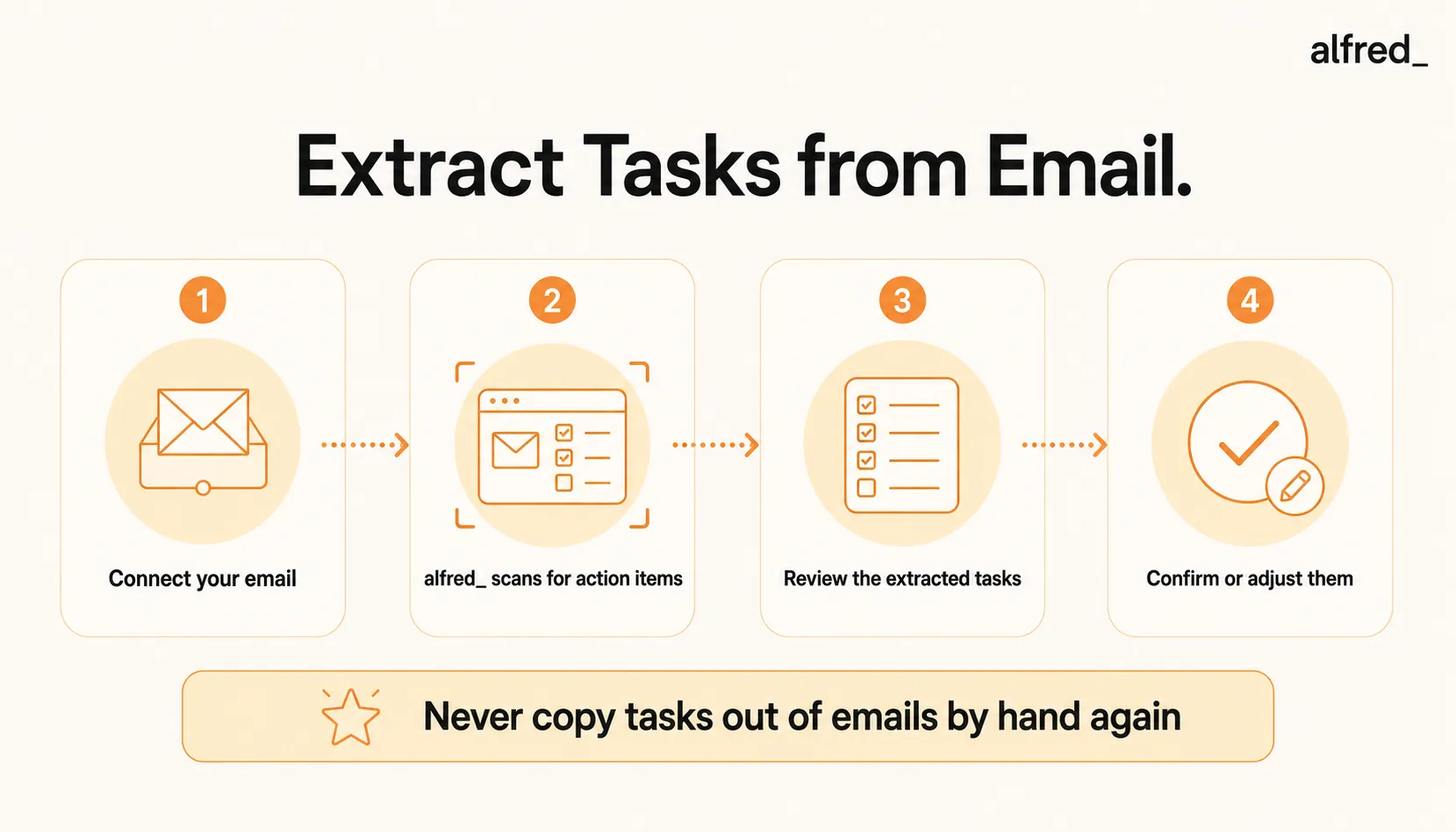
Step-by-Step: Set Up Automatic Task Extraction with alfred_
1. Connect Your Email Account
Sign up for alfred_ and connect your Gmail or Outlook account:
- Go to get-alfred.ai/signup
- Click “Connect Email”
- Authorize access via OAuth
alfred_ needs read access to identify tasks in your emails.
2. alfred_ Scans for Action Items
As emails arrive, alfred_ automatically identifies:
- Explicit requests (“Can you send me…”)
- Commitments you made (“I’ll have that to you by…”)
- Deadlines mentioned (“…by Friday”)
- Follow-ups needed (“Let’s reconnect next week”)
- Action items in meeting notes
This happens continuously, overnight, during meetings, while you’re doing deep work.
3. Review Extracted Tasks
Check your morning brief to see tasks extracted from emails:
Tasks Extracted Today
Send Q4 proposal to Sarah
Review attached contract draft
Schedule call with investor
Each task shows the source email, deadline (if mentioned), and a link back to the original message.
4. Confirm or Adjust
For each extracted task:
- Confirm: Task is correct, add to your list
- Edit: Adjust the wording or deadline
- View source: Click to see the original email
Confirmed tasks appear in your task list, linked to the source email for context.
What Automatic Task Extraction Looks Like in Practice
Before: Manual Task Creation
- 8:00 AM: Read email from client. “Can you send the updated pricing by EOD?”
- 8:02 AM: Open task app. Type “Send updated pricing to client.” Add deadline.
- 8:05 AM: Read next email. “Following up on the proposal, can we discuss Thursday?”
- 8:07 AM: Back to task app. Type “Schedule call with…” Can’t remember their name. Go back to email.
- 8:10 AM: Continue through 15 more emails with hidden tasks…
- 8:45 AM: Finally done creating tasks. Probably missed a few.
Time spent: 45 minutes copying tasks from email
After: Automatic Extraction
- 8:00 AM: Open alfred_. Morning brief shows 7 tasks extracted overnight.
- 8:01 AM: “Send updated pricing to client - Due: Today” ✓ Confirm
- 8:02 AM: “Schedule call with Marcus Chen - Due: Thursday” ✓ Confirm
- 8:03 AM: Review remaining 5 tasks. Confirm all.
- 8:05 AM: All tasks on your list. Linked to source emails. Start working.
Time spent: 5 minutes confirming extracted tasks
That’s 40 minutes saved every morning, and nothing slips through the cracks.
What alfred_ Extracts Automatically
Extracts Well
- “Can you send me…” requests
- “Please review…” asks
- Explicit deadlines (“by Friday”)
- Meeting scheduling requests
- Follow-up commitments
- Document requests
- Approval requests
- Action items in bullet points
What Gets Linked
- Source email (click to view)
- Sender information
- Thread context
- Mentioned deadlines
- Related attachments
- Previous conversation history
The link back to the source email is crucial, when you start working on a task, you have full context without searching through your inbox.
Why This Matters: Nothing Slips Through
The real value of automatic task extraction isn’t just time savings. It’s reliability. When tasks are extracted automatically:
No More Missed Commitments
Every request in your inbox becomes a tracked task. That “can you send me…” email from two weeks ago? It’s in your task list with a deadline, not buried in your inbox.
No More “Did I Already Do This?”
Tasks are linked to emails. When you complete a task, you know exactly what was asked and can verify you delivered. No second-guessing.
No More Context Switching
Stop bouncing between email and your task app. alfred_ bridges the gap, tasks appear automatically, linked to their source.
Beyond Extraction: The Full Workflow
Task extraction works alongside other alfred_ features:
- Email triage: Before extracting tasks, alfred_ sorts your inbox automatically, archiving noise so you only see emails that matter.
- Draft replies: For task-related emails, alfred_ also drafts responses (“I’ll have that to you by Friday”).
- Follow-up tracking: When you’re waiting on someone, alfred_ monitors the thread and alerts you if they haven’t responded.
- Calendar integration: Tasks with deadlines integrate with your calendar through a unified email, calendar, and task system, so you see commitments in context with your schedule.
Task extraction is one of the 10 ways AI handles your email, part of an AI executive assistant that manages your workflow end-to-end.
Get Started in 5 Minutes
Setting up automatic task extraction is faster than manually creating tasks from one batch of emails:
- 1. Sign up at get-alfred.ai (free tier available)
- 2. Connect Gmail or Outlook
- 3. Check your morning brief tomorrow
- 4. Review and confirm extracted tasks
That’s it. Tomorrow you’ll have tasks waiting, extracted from your emails automatically, linked to their source, ready to work on.




