

Shortwave is the email client that makes you say “why doesn’t Gmail do this?” Natural language search that actually understands your questions. Thread summaries that save you from reading 47-message chains. A clean, fast interface that feels like it was designed in this decade rather than the last one.
It is also the email client that makes you realize the limit of what a client can do, no matter how good the AI is. Because at the end of the day, you are still sitting in your inbox, processing email, one thread at a time.
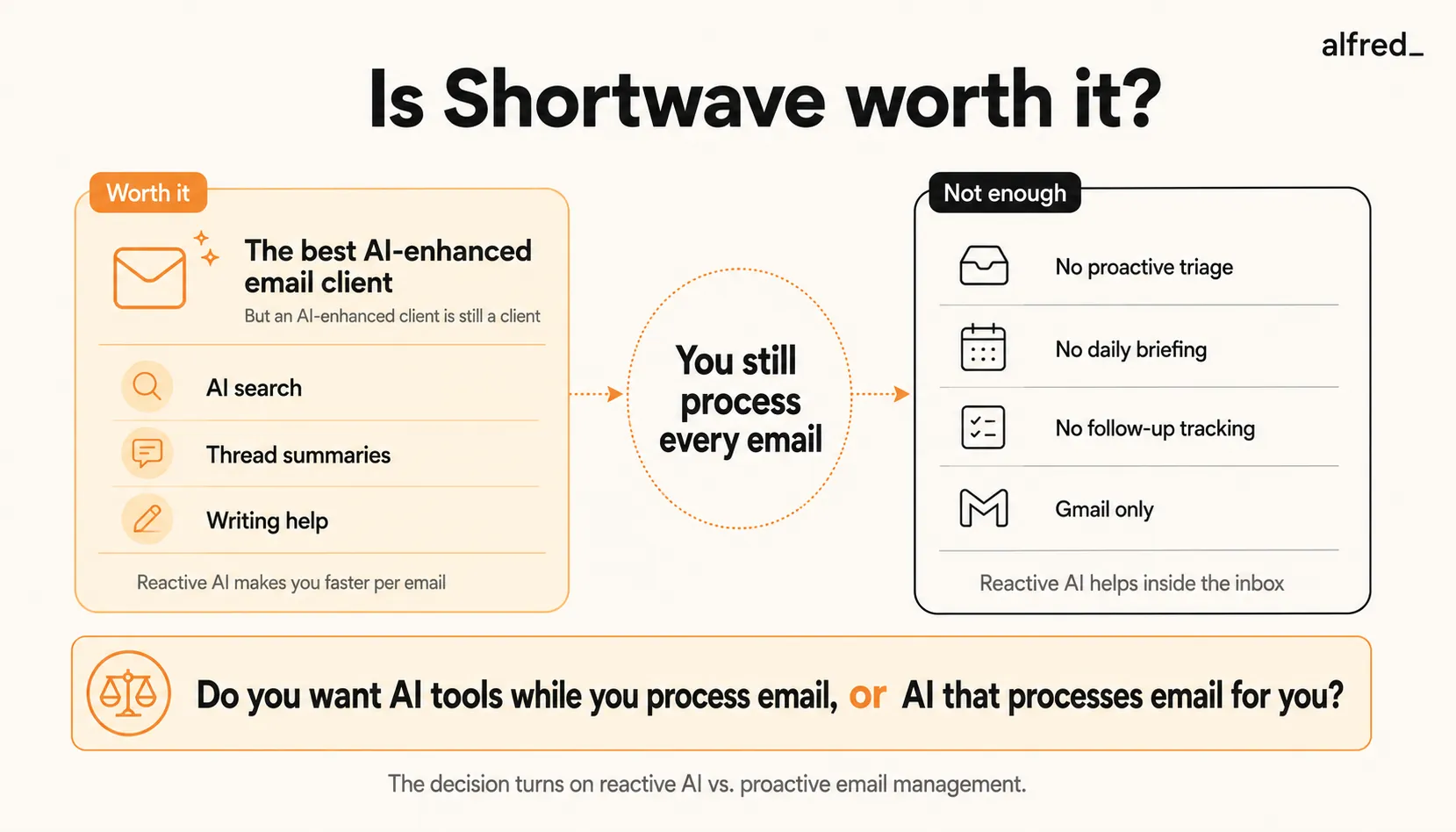
What Shortwave Does Well
AI search is Shortwave’s main feature. Instead of constructing boolean search queries with from: and after: operators, you type “what did the design team say about the rebrand timeline?” and Shortwave finds the answer. Not just the email, the answer, synthesized from multiple messages. For anyone who has ever spent 15 minutes searching for a specific piece of information buried in email, this is transformative.
Thread summaries save real time. Long email threads, the ones with 20+ replies, forwards, and side conversations, get instant AI summaries. You see the key points, decisions made, and outstanding questions without reading every message. This is not a gimmick. On a busy day, thread summaries can save 30-60 minutes.
The writing assistant is well-integrated. Shortwave’s AI writing understands the context of the thread you are replying to. It does not just generate generic text. It references specific points from the conversation. You can also adjust tone and length. It is not perfect, but it is the most contextually aware email writing AI in any client.
The interface is clean and thoughtful. Shortwave bundles related emails together, surfaces priority messages, and provides a reading experience that feels calm rather than chaotic. The design choices are opinionated in good ways. It feels like an email client designed by people who actually think about information architecture.
A free trial is available. Shortwave offers a trial period so you can test the product before committing. The entry-level Business plan at $24/month covers all your connected Gmail accounts for one flat rate.
Keyboard shortcuts are solid. Not as extensive as Superhuman’s, but well-designed and fast. Power users can navigate entirely by keyboard.
What Shortwave Does Not Do
It does not triage your inbox proactively. When you open Shortwave in the morning, your emails are there, bundled and organized, but not evaluated. No one has read them and decided which ones matter. No one has identified the three urgent items buried in the 47 new messages. You still do that work, Shortwave just gives you a nicer environment to do it in.
It does not draft replies before you ask. Shortwave’s writing assistant activates when you click reply and ask for help. It does not proactively prepare draft responses to routine emails. The difference matters: reactive AI helps you write faster when you decide to write. Proactive AI writes before you even open the email.
There is no daily briefing. You do not get a summary of what happened overnight, what needs attention, or what follow-ups are overdue. You discover this information by processing your inbox, email by email. The thread summaries help once you open a thread, but there is no high-level overview of your day.
No follow-up tracking. Shortwave does not automatically track who owes you a reply, what commitments were made in emails, or what deadlines are approaching. If you send an important email and the recipient does not respond, you need to remember to check.
No calendar or task integration. Emails about meetings do not automatically update your calendar. Emails containing action items do not create tasks. Your email, calendar, and to-do list remain separate systems that you manually keep in sync.
Gmail only. This is a hard constraint. If your organization uses Microsoft 365, Shortwave is not an option. No Outlook support, no IMAP support. You need a Google account.
Pricing Breakdown
Shortwave offers three tiers:
- Business: $24/month (annual billing), standard AI intelligence, five years of AI search history, three AI filters
- Premier: $36/month (annual billing), advanced AI intelligence, unlimited AI search history, ten AI filters, double AI usage
- Max: $100/month (annual billing), expert AI intelligence with adaptive thinking, six times more AI usage, fifty AI filters
All paid plans cover all your connected Gmail accounts for one flat rate, which is a nice touch.
For comparison:
- Gmail is free (with limited Gemini AI features)
- Superhuman is $30-40/month (speed-focused, no AI search)
- SaneBox is $7-36/month (filtering only)
- alfred_ is $29.99/month (proactive AI assistant)
Shortwave’s pricing has increased significantly from its earlier tiers. The Business plan at $24/month is the new entry point, comparable to Superhuman’s Starter plan.
Who Should Buy Shortwave
Gmail power users who want AI assistance without leaving email. If you process email as a core part of your job and want AI tools available while you work, Shortwave is an option. The AI search alone justifies the cost for people who frequently need to find information in their email history.
People who need AI search across large email archives. If you have years of email history and regularly need to find specific conversations, decisions, or documents, Shortwave’s natural language search works. The Business plan covers five years of history, while the Premier and Max plans offer unlimited AI search history.
Professionals who write a lot of email. If you compose 30+ emails per day, the contextual writing assistant adds up to meaningful time savings. It understands the thread, references the right details, and drafts in your voice.
People who dislike Gmail’s interface. If Gmail feels cluttered and outdated but you are locked into Google Workspace, Shortwave is an alternative interface. It is what Gmail should be.
Who Should Not Buy Shortwave
Anyone using Microsoft 365 or Outlook. Full stop. Shortwave does not support Outlook accounts. If your organization is on Microsoft’s ecosystem, look elsewhere.
People who want email handled for them, not just AI-assisted. If your goal is to spend less time in email, not to be more productive while in email, Shortwave is the wrong tool. You still process every email. The AI helps you do it, but you are still doing it.
Professionals overwhelmed by email volume. Shortwave makes processing 150 emails per day more pleasant and slightly faster. But you still process 150 emails. If volume is your problem, you need something that reduces how many emails require your attention, not something that makes attention more efficient.
Teams that need collaboration features. Shortwave’s Business plan has basic team features, but it is not a collaborative email tool in the way Spark or Front are. If shared inboxes and team workflows are important, Shortwave is not the best fit.
Where alfred_ Fits
alfred_ is an AI assistant for client-facing teams, and each person on the team gets their own. It keeps a list of the replies you owe, finds who you’re still waiting on when you ask, manages your calendar, prepares you for meetings and sends a morning brief, across Gmail and Outlook. Shortwave and alfred_ represent two different visions of how AI should interact with your email.
Shortwave puts AI tools in your hands while you work. You open your email, and AI search, summaries, and writing are available when you need them. The AI is reactive. It responds to your requests.
alfred_ puts AI to work before you arrive. Your inbox is triaged overnight. Draft replies to routine emails are waiting for your review. A morning brief tells you what matters. Follow-ups are tracked automatically. The AI is proactive. It does the work and asks for your judgment.
The distinction is practical: with Shortwave, you spend less effort per email but still process all of them. With alfred_, you process fewer emails because most of the routine ones are already handled.
At $29.99/month, alfred_ costs roughly the same as Shortwave’s Business plan ($24/month) but offers a fundamentally different approach. The value proposition is different enough that they are not direct substitutes. It depends on whether you want AI tools while you work or AI work while you live.
Some users run both: Shortwave as their email client for the messages that need manual attention, and alfred_ as the background layer that ensures fewer messages need manual attention in the first place.
The Verdict
Shortwave is an AI-enhanced email client. The AI search is genuinely transformative. The thread summaries save real time. The writing assistant is contextually intelligent. The interface is clean and fast. At $24-36/month for the main tiers, the pricing is premium but reflects the AI capabilities.
But Shortwave is still a client. You work inside it. You process email inside it. The AI helps you work. It does not work for you.
If you enjoy processing email and want better tools for the job, Shortwave is an option. If you want to stop processing email and let AI handle the routine work, you need a different approach.
Shortwave is an answer to “how do I process email better?” It is not the answer to “how do I process less email?”




